
Close Menu
  • Home
  • AI
  • Big Data
  • Cloud Computing
  • iOS Development
  • IoT
  • IT/ Cybersecurity
  • Tech
    • Nanotechnology
    • Green Technology
    • Apple
    • Software Development
    • Software Engineering

Subscribe to Updates

Get the latest technology news from Bigteetechhub about IT, Cybersecurity and Big Data.

    What's Hot

    flutter – firebase_messaging onMessage stream never fires after UIScene migration on iOS

    April 15, 2026

    Grief and the Nonprofessional Programmer – O’Reilly

    April 15, 2026

    AI data center startup Fluidstack in talks for $1B round at $18B valuation months after hitting $7.5B, says report

    April 15, 2026
    Facebook X (Twitter) Instagram
    Facebook X (Twitter) Instagram
    Big Tee Tech Hub
    • Home
    • AI
    • Big Data
    • Cloud Computing
    • iOS Development
    • IoT
    • IT/ Cybersecurity
    • Tech
      • Nanotechnology
      • Green Technology
      • Apple
      • Software Development
      • Software Engineering
    Big Tee Tech Hub
    Home»IT/ Cybersecurity»Microsoft adds Windows protections for malicious Remote Desktop files
    IT/ Cybersecurity

    Microsoft adds Windows protections for malicious Remote Desktop files

    big tee tech hubBy big tee tech hubApril 15, 2026003 Mins Read
    Share Facebook Twitter Pinterest Copy Link LinkedIn Tumblr Email Telegram WhatsApp
    Follow Us
    Google News Flipboard
    Microsoft adds Windows protections for malicious Remote Desktop files
    Share
    Facebook Twitter LinkedIn Pinterest Email Copy Link


    Microsoft adds Windows protections for malicious Remote Desktop files

    Microsoft has introduced new Windows protections to defend against phishing attacks that abuse Remote Desktop connection (.rdp) files, adding warnings and disabling risky shared resources by default.

    RDP files are commonly used in enterprise environments to connect to remote systems because admins can preconfigure them to automatically redirect local resources to the remote host.

    Threat actors have increasingly abused this functionality in phishing campaigns. The Russian state-sponsored APT29 hacking group has previously used rogue RDP files to remotely steal data and credentials from victims.

    Wiz

    When opened, these files can connect to attacker-controlled systems and redirect local drives to the connected device, allowing the attacker-controlled device to steal files and credentials stored on disk.

    They can also capture clipboard data, such as passwords or sensitive text, or redirect authentication mechanisms like smart cards or Windows Hello to impersonate users

    New RDP protections roll out

    As part of the April 2026 cumulative updates for Windows 10 (KB5082200) and Windows 11 (KB5083769 and KB5082052), Microsoft has now released new protections to prevent malicious RDP connection files from being used on devices.

    “Malicious actors misuse this capability by sending RDP files through phishing emails,” warns Microsoft.

    “When a victim opens the file, their device silently connects to a server controlled by the attacker and shares local resources, giving the attacker access to files, credentials, and more.”

    After installing this update, when users open an RDP file for the first time, a one-time educational prompt is shown that explains what RDP files are and warns about their risks. Windows users will then be prompted to acknowledge that they understand the risks and press OK, which will prevent the alert from being shown again.
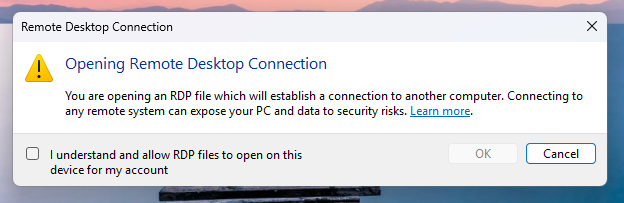
    Educational dialog warning about the risks of RDP files
    Educational dialog warning about the risks of RDP files
    Source: Microsoft

    Future attempts to open RDP files will now display a security dialog before any connection is made.

    This dialog shows whether the RDP file is signed by a verified publisher, the remote system’s address, and lists all local resource redirections, such as drives, clipboard, or devices, with every option disabled by default.

    If a file is not digitally signed, Windows displays a “Caution: Unknown remote connection” warning and labels the publisher as unknown, indicating there is no way to verify who created the file.
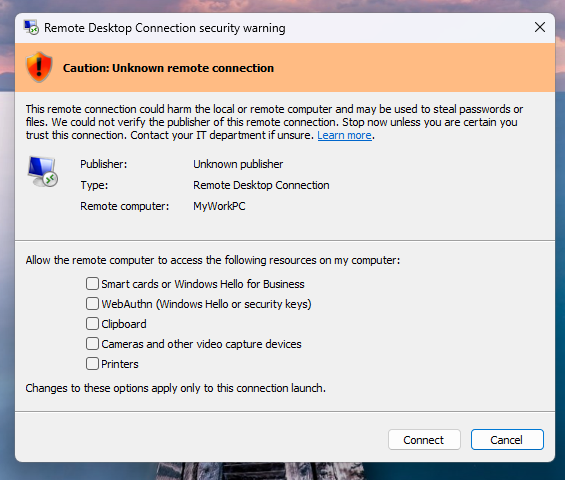
    Windows warning that an RDP file is from an unverified publisher
    Windows warning that an RDP file is from an unverified publisher
    Source: Microsoft

    If the RDP file is digitally signed, Windows will display the publisher, but still warn you to verify their legitimacy before connecting.

    It should be noted that these new protections apply only to connections initiated by opening RDP files, not to those made through the Windows Remote Desktop client.

    Microsoft says that Administrators can temporarily disable these protections by going to the HKLM\Software\Policies\Microsoft\Windows NT\Terminal Services\Client Registry key and modifying the RedirectionWarningDialogVersion value so it is set to 1.

    However, as RDP files have historically been abused in attacks, it is strongly recommended to keep these protections enabled.


    tines

    Automated pentesting proves the path exists. BAS proves whether your controls stop it. Most teams run one without the other.

    This whitepaper maps six validation surfaces, shows where coverage ends, and provides practitioners with three diagnostic questions for any tool evaluation.


    Source link

    Adds desktop files Malicious Microsoft protections Remote Windows
    Follow on Google News Follow on Flipboard
    Share. Facebook Twitter Pinterest LinkedIn Tumblr Email Copy Link
    tonirufai
    big tee tech hub
    • Website

    Related Posts

    ShowDoc RCE Flaw CVE-2025-0520 Actively Exploited on Unpatched Servers

    April 14, 2026

    Germany Doxes “UNKN,” Head of RU Ransomware Gangs REvil, GandCrab – Krebs on Security

    April 13, 2026

    Launching S3 Files, making S3 buckets accessible as file systems

    April 12, 2026
    Add A Comment
    Leave A Reply Cancel Reply

    Editors Picks

    flutter – firebase_messaging onMessage stream never fires after UIScene migration on iOS

    April 15, 2026

    Grief and the Nonprofessional Programmer – O’Reilly

    April 15, 2026

    AI data center startup Fluidstack in talks for $1B round at $18B valuation months after hitting $7.5B, says report

    April 15, 2026

    Microsoft adds Windows protections for malicious Remote Desktop files

    April 15, 2026
    About Us
    About Us

    Welcome To big tee tech hub. Big tee tech hub is a Professional seo tools Platform. Here we will provide you only interesting content, which you will like very much. We’re dedicated to providing you the best of seo tools, with a focus on dependability and tools. We’re working to turn our passion for seo tools into a booming online website. We hope you enjoy our seo tools as much as we enjoy offering them to you.

    Don't Miss!

    flutter – firebase_messaging onMessage stream never fires after UIScene migration on iOS

    April 15, 2026

    Grief and the Nonprofessional Programmer – O’Reilly

    April 15, 2026

    Subscribe to Updates

    Get the latest technology news from Bigteetechhub about IT, Cybersecurity and Big Data.

      • About Us
      • Contact Us
      • Disclaimer
      • Privacy Policy
      • Terms and Conditions
      © 2026 bigteetechhub.All Right Reserved

      Type above and press Enter to search. Press Esc to cancel.