

Close Menu
  • Home
  • AI
  • Big Data
  • Cloud Computing
  • iOS Development
  • IoT
  • IT/ Cybersecurity
  • Tech
    • Nanotechnology
    • Green Technology
    • Apple
    • Software Development
    • Software Engineering

Subscribe to Updates

Get the latest technology news from Bigteetechhub about IT, Cybersecurity and Big Data.

    What's Hot

    Setting Up a Google Colab AI-Assisted Coding Environment That Actually Works

    March 11, 2026

    The economics of enterprise AI: What the Forrester TEI study reveals about Microsoft Foundry

    March 11, 2026

    The search for new bosons beyond Higgs – Physics World

    March 11, 2026
    Facebook X (Twitter) Instagram
    Facebook X (Twitter) Instagram
    Big Tee Tech Hub
    • Home
    • AI
    • Big Data
    • Cloud Computing
    • iOS Development
    • IoT
    • IT/ Cybersecurity
    • Tech
      • Nanotechnology
      • Green Technology
      • Apple
      • Software Development
      • Software Engineering
    Big Tee Tech Hub
    Home»IT/ Cybersecurity»Microsoft Edge is now up to 9% faster
    IT/ Cybersecurity

    Microsoft Edge is now up to 9% faster

    big tee tech hubBy big tee tech hubApril 11, 2025003 Mins Read
    Share Facebook Twitter Pinterest Copy Link LinkedIn Tumblr Email Telegram WhatsApp
    Follow Us
    Google News Flipboard
    Microsoft Edge is now up to 9% faster
    Share
    Facebook Twitter LinkedIn Pinterest Email Copy Link


    Microsoft Edge is now up to 9% faster

    The Chromium-based Microsoft Edge has seen up to 9% performance improvements following the release of version 134.

    In a blog post, Microsoft noted that it truly cares about delivering better performance with Edge and recently made several changes to the underlying engine in the browser.

    Thanks to these changes, Edge 134 is now up to 9% faster compared to older versions, based on a tool called Speedometer 3.0 that simulates real web usage.

    “Our unique approach, and focus, on optimizing speed, and the code changes we continuously make to Edge, and to the Chromium rendering engine within it, have led to real-world performance improvements when using the browser on a variety of hardware running on Windows and macOS,” Microsoft wrote in a blog post.

    Microsoft has made the Edge browser launch faster and move between web pages quicker. According to their data:

    This means less waiting when you open Edge or click on links.
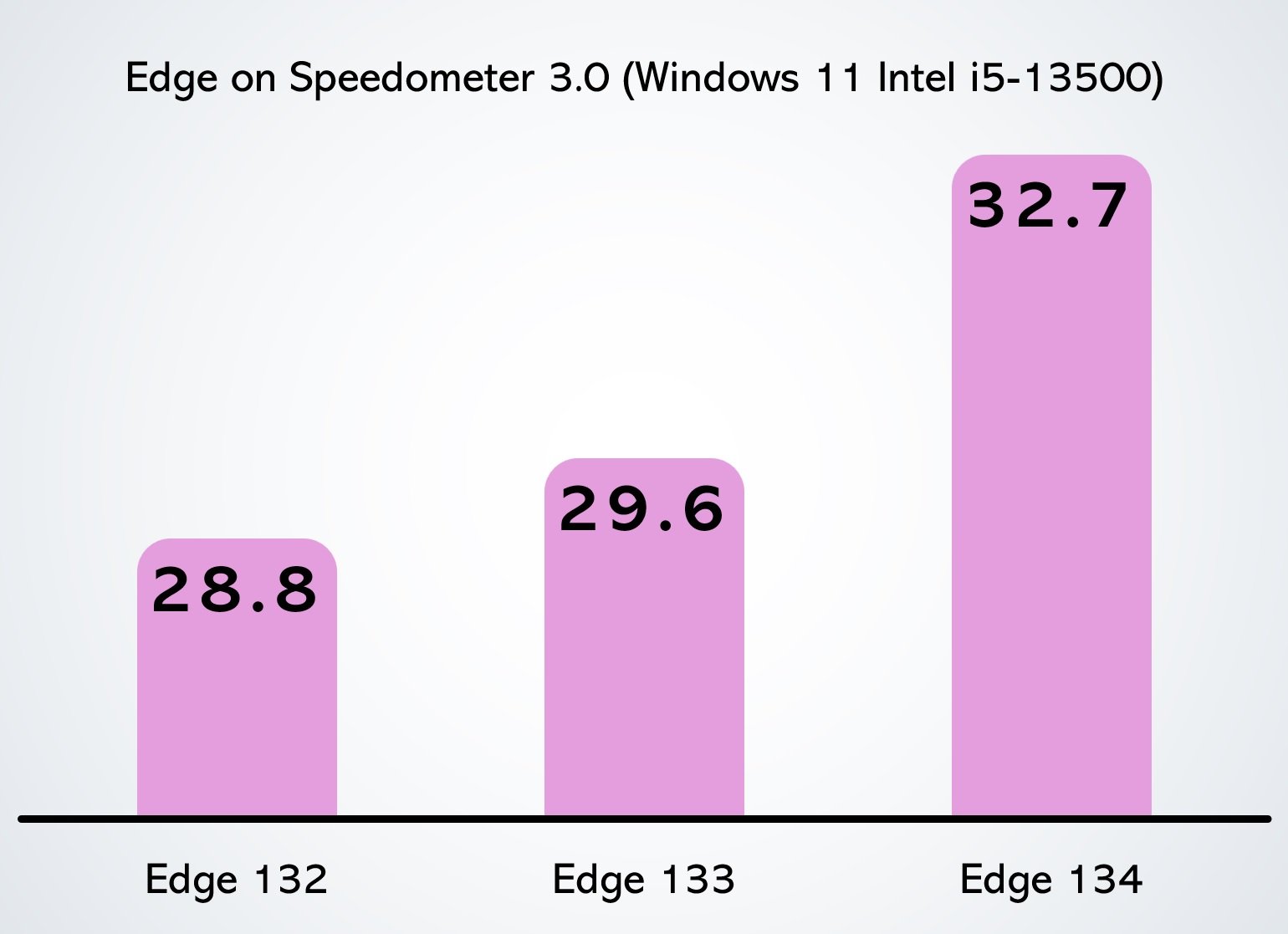
    Edge
    Microsoft Edge performance gains

    Source: BleepingComputer

    Edge now also reacts quicker when you interact with websites, such as like clicking buttons, scrolling, or typing.

    There’s a 5% to 7% improvement in how responsive pages feel.

    “In addition to better performance in benchmarks, we’re also seeing improvements across several core performance metrics between Edge 133 and 134, including: 1.7% faster navigation times 2% faster startup times 5% to 7% improvement in web page responsiveness,” Microsoft noted.

    These results were based on Microsoft’s field telemetry, which simulates real-world web usage on all types of hardware and websites.

    Microsoft Edge elements are also faster

    When Microsoft Edge first launched, it was faster than Google Chrome. However, over time, the browser became cluttered with unnecessary features.

    For instance, elements like the three-dot menu, Extensions tab, Collections, and others started taking longer than usual to open compared to other browsers.

    Microsoft identified the problem and recently rolled out significant performance improvements for Downloads, Drop, History, and the InPrivate new tab experience.

    “In fact, no less than 14 different areas of the user interface throughout the browser are now 40% faster than before, on average, Microsoft noted in a blog post published in February.

    This includes Favorites and Browser Essentials in Microsoft Edge.

    All these improvements are available with Microsoft Edge 134 or newer.


    Red Report 2025

    Based on an analysis of 14M malicious actions, discover the top 10 MITRE ATT&CK techniques behind 93% of attacks and how to defend against them.


    Source link

    edge Faster Microsoft
    Follow on Google News Follow on Flipboard
    Share. Facebook Twitter Pinterest LinkedIn Tumblr Email Copy Link
    tonirufai
    big tee tech hub
    • Website

    Related Posts

    The economics of enterprise AI: What the Forrester TEI study reveals about Microsoft Foundry

    March 11, 2026

    FortiGate Devices Exploited to Breach Networks and Steal Service Account Credentials

    March 11, 2026

    How AI Assistants are Moving the Security Goalposts – Krebs on Security

    March 10, 2026
    Add A Comment
    Leave A Reply Cancel Reply

    Editors Picks

    Setting Up a Google Colab AI-Assisted Coding Environment That Actually Works

    March 11, 2026

    The economics of enterprise AI: What the Forrester TEI study reveals about Microsoft Foundry

    March 11, 2026

    The search for new bosons beyond Higgs – Physics World

    March 11, 2026

    Amazon is linking site hiccups to AI efforts

    March 11, 2026
    About Us
    About Us

    Welcome To big tee tech hub. Big tee tech hub is a Professional seo tools Platform. Here we will provide you only interesting content, which you will like very much. We’re dedicated to providing you the best of seo tools, with a focus on dependability and tools. We’re working to turn our passion for seo tools into a booming online website. We hope you enjoy our seo tools as much as we enjoy offering them to you.

    Don't Miss!

    Setting Up a Google Colab AI-Assisted Coding Environment That Actually Works

    March 11, 2026

    The economics of enterprise AI: What the Forrester TEI study reveals about Microsoft Foundry

    March 11, 2026

    Subscribe to Updates

    Get the latest technology news from Bigteetechhub about IT, Cybersecurity and Big Data.

      • About Us
      • Contact Us
      • Disclaimer
      • Privacy Policy
      • Terms and Conditions
      © 2026 bigteetechhub.All Right Reserved

      Type above and press Enter to search. Press Esc to cancel.