
Close Menu
  • Home
  • AI
  • Big Data
  • Cloud Computing
  • iOS Development
  • IoT
  • IT/ Cybersecurity
  • Tech
    • Nanotechnology
    • Green Technology
    • Apple
    • Software Development
    • Software Engineering

Subscribe to Updates

Get the latest technology news from Bigteetechhub about IT, Cybersecurity and Big Data.

    What's Hot

    A deep dive into Apple’s AI strategy reset, as it prepares to announce a Gemini-powered personalized Siri next month and a reimagined chatbot-like Siri at WWDC (Mark Gurman/Bloomberg)

    January 25, 2026

    European Space Agency’s cybersecurity in freefall as yet another breach exposes spacecraft and mission data

    January 25, 2026

    The human brain may work more like AI than anyone expected

    January 25, 2026
    Facebook X (Twitter) Instagram
    Facebook X (Twitter) Instagram
    Big Tee Tech Hub
    • Home
    • AI
    • Big Data
    • Cloud Computing
    • iOS Development
    • IoT
    • IT/ Cybersecurity
    • Tech
      • Nanotechnology
      • Green Technology
      • Apple
      • Software Development
      • Software Engineering
    Big Tee Tech Hub
    Home»iOS Development»How to make a Swift framework?
    iOS Development

    How to make a Swift framework?

    big tee tech hubBy big tee tech hubJuly 22, 2025004 Mins Read
    Share Facebook Twitter Pinterest Copy Link LinkedIn Tumblr Email Telegram WhatsApp
    Follow Us
    Google News Flipboard
    How to make a Swift framework?
    Share
    Facebook Twitter LinkedIn Pinterest Email Copy Link


    Creating a Swift framework shouldn’t be hard. This tutorial will help you making a universal framework for complex projects.

    What is a framework?

    A framework is a hierarchical directory that encapsulates shared resources, such as a dynamic shared library, nib files, image files, localized strings, header files, and reference documentation in a single package.

    So in a nutshell, a framework is a highly reusable component for your apps.

    How to make it?

    There is an article about Xcode conventions which will help you organize your projects, you should check that first, if you haven’t before.

    Traditional way

    There is a traditional way to make a framework in Xcode. I’m going to create a shared framework for all the apple platforms (iOS, macOS, tvOS, watchOS), which is going to be capable of logging things to the standard console.

    Let’s make the project:

    • Create a new project using one of the framework targets
    • Follow the instructions fill & name all the fields
    • Add all the other platform framework targets
    • Rename all targets according to the platform names

    Now in Finder:

    • Create a Sources folder and move all the Swift and header files there
    • Create an Assets folder with platforms subfolders
    • Move all the Info.plist files into the correct platfrom subdirectory
    • Create a Tests folder and move test files there

    Back to Xcode:

    • Remove every group and add the new Folders from Finder
    • Check that every target has the correct files (framework & tests)
    • Inside the header file, replace UIKit depencency with Foundation

    The goal is to achieve a structure somewhat like this:
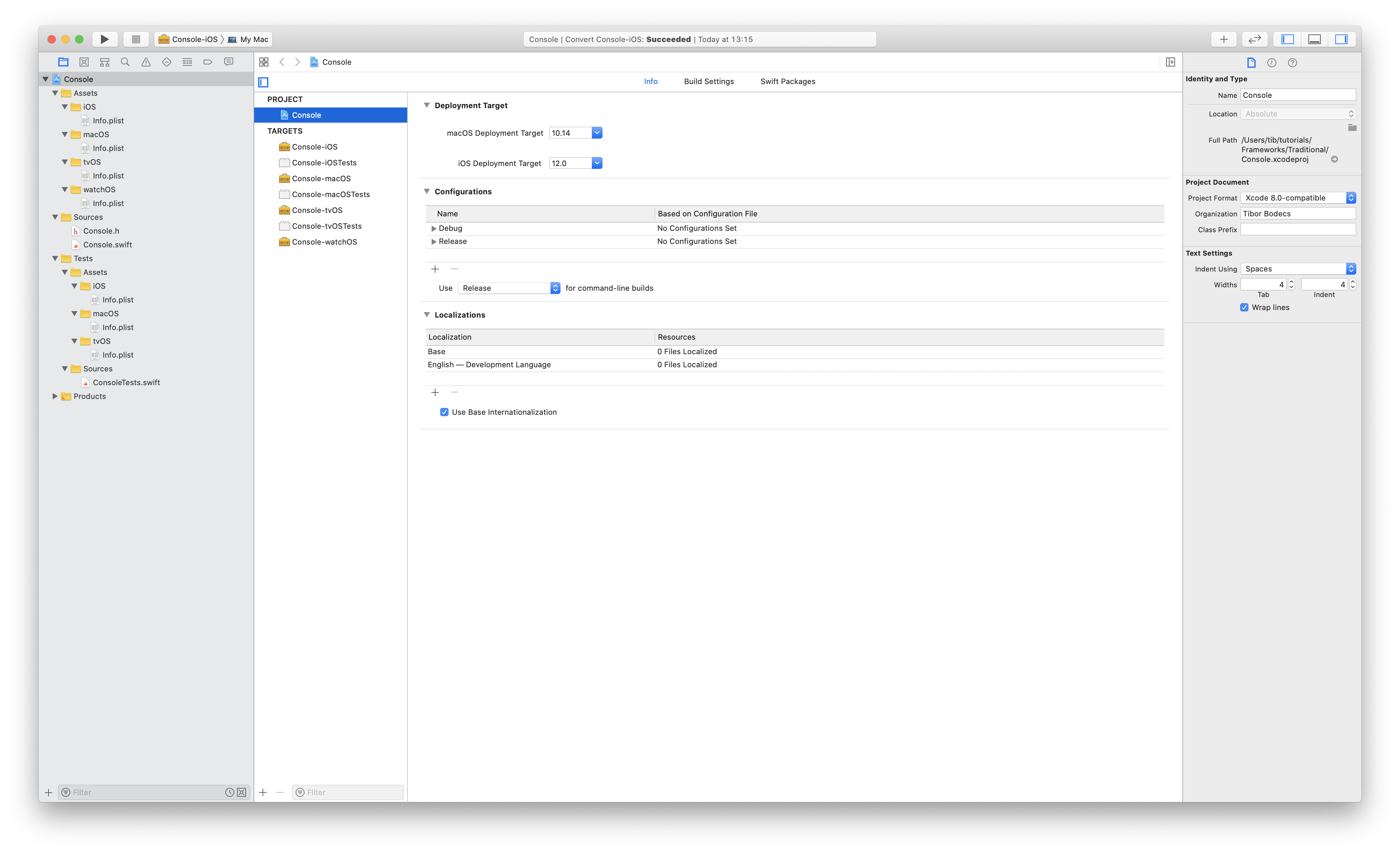
    How to make a Swift framework?

    Project settings:

    • Select the correct plist files for the targets
    • Set your bundle identifiers (use my conventions)
    • Setup platform versions (advice: support 1 older version too)
    • Setup the plist files for the tests from the build settings pane
    • Set the product name (Console) in your framework build settings
    • Check your build phases and add the public header file.

    Scheme settings:

    • Go to the scheme settings and setup shared schemes for the frameworks
    • Gather coverage data if you need it
    • Write your framework you can use Swift “macros” to detect platforms

    There is a flag in Xcode to allow app extension API only, if you are embedding your framework inside an application extension it should be enabled!

    Congratulations, now you have your brand new Swift framework made in the traditional way. Let’s continue with a neat trick.

    Universal cross platform framework

    It is possible to create a multiplatform single scheme Xcode project with cross platform support for every platform, but it’s not recommended because it’s a hack. However multiple open source libraries do the same way, so why shouldn’t we.

    • Delete all the targets, schemes, except macOS!!!
    • Rename the remaining target, scheme (we don’t need platform names)
    • Use the project configuration file, set the xcconfig on the project
    • Delete Info.plist files, use one for the framework and one for the tests
    • Rename bundle identifier (we don’t need platform names there too)

    States can be mixed up if you are building for multiple platforms, however this is a nice clean way to support every platforms, without duplications.

    How to use a Swift framework?

    Embedding your framework is the most straightforward thing to do. You can simply drag the framework project to another Xcode project, the only thing left to do is to the embedded the framework into the application. You can go to the embedded binaries section inside the general project info tab and add the framework as a dependency.

    Swift Package Manager

    With SPM, you have to make a Package.swift file first, then you’ll be able to build your targets with the swift build command. Now that Xcode supports the Swift Package Manager, it’s really easy to integrate third party frameworks by using it.

    You can download the final framework examples from GitHub.

    Make sure that you don’t miss out my deep dive into swift frameworks post.


    Source link

    framework Swift
    Follow on Google News Follow on Flipboard
    Share. Facebook Twitter Pinterest LinkedIn Tumblr Email Copy Link
    tonirufai
    big tee tech hub
    • Website

    Related Posts

    ios – Why does my page scroll up when I tap on a button?

    January 25, 2026

    swift – iOS suspends app after BLE discovery even though I start Always-authorized location udpates

    January 24, 2026

    ios – ASAuthorizationControllerDelegate always returns .canceled for Face ID passcode fallback and failed attempts

    January 23, 2026
    Add A Comment
    Leave A Reply Cancel Reply

    Editors Picks

    A deep dive into Apple’s AI strategy reset, as it prepares to announce a Gemini-powered personalized Siri next month and a reimagined chatbot-like Siri at WWDC (Mark Gurman/Bloomberg)

    January 25, 2026

    European Space Agency’s cybersecurity in freefall as yet another breach exposes spacecraft and mission data

    January 25, 2026

    The human brain may work more like AI than anyone expected

    January 25, 2026

    Non-Abelian anyons: anything but easy

    January 25, 2026
    About Us
    About Us

    Welcome To big tee tech hub. Big tee tech hub is a Professional seo tools Platform. Here we will provide you only interesting content, which you will like very much. We’re dedicated to providing you the best of seo tools, with a focus on dependability and tools. We’re working to turn our passion for seo tools into a booming online website. We hope you enjoy our seo tools as much as we enjoy offering them to you.

    Don't Miss!

    A deep dive into Apple’s AI strategy reset, as it prepares to announce a Gemini-powered personalized Siri next month and a reimagined chatbot-like Siri at WWDC (Mark Gurman/Bloomberg)

    January 25, 2026

    European Space Agency’s cybersecurity in freefall as yet another breach exposes spacecraft and mission data

    January 25, 2026

    Subscribe to Updates

    Get the latest technology news from Bigteetechhub about IT, Cybersecurity and Big Data.

      • About Us
      • Contact Us
      • Disclaimer
      • Privacy Policy
      • Terms and Conditions
      © 2026 bigteetechhub.All Right Reserved

      Type above and press Enter to search. Press Esc to cancel.