
Close Menu
  • Home
  • AI
  • Big Data
  • Cloud Computing
  • iOS Development
  • IoT
  • IT/ Cybersecurity
  • Tech
    • Nanotechnology
    • Green Technology
    • Apple
    • Software Development
    • Software Engineering

Subscribe to Updates

Get the latest technology news from Bigteetechhub about IT, Cybersecurity and Big Data.

    What's Hot

    Setting Up a Google Colab AI-Assisted Coding Environment That Actually Works

    March 11, 2026

    The economics of enterprise AI: What the Forrester TEI study reveals about Microsoft Foundry

    March 11, 2026

    The search for new bosons beyond Higgs – Physics World

    March 11, 2026
    Facebook X (Twitter) Instagram
    Facebook X (Twitter) Instagram
    Big Tee Tech Hub
    • Home
    • AI
    • Big Data
    • Cloud Computing
    • iOS Development
    • IoT
    • IT/ Cybersecurity
    • Tech
      • Nanotechnology
      • Green Technology
      • Apple
      • Software Development
      • Software Engineering
    Big Tee Tech Hub
    Home»Apple»This new Apple Intelligence feature in iOS 26 might be one of my all-time favorites
    Apple

    This new Apple Intelligence feature in iOS 26 might be one of my all-time favorites

    big tee tech hubBy big tee tech hubJanuary 11, 2026022 Mins Read
    Share Facebook Twitter Pinterest Copy Link LinkedIn Tumblr Email Telegram WhatsApp
    Follow Us
    Google News Flipboard
    This new Apple Intelligence feature in iOS 26 might be one of my all-time favorites
    Share
    Facebook Twitter LinkedIn Pinterest Email Copy Link


    Here are the things I love most about iOS 26 | Stylized iOS 26 graphic with a liquid glass heart

    It’s been half a year since iOS 26 debuted in beta, so I’ve had quite a bit of time to sit with it. In a release with such a massive redesign, it’s easy for some of the smaller additional features to fly under the radar – but after giving iOS 26 my fair shot, I’ve come to really like one underlying feature in particular, and it has to do with screenshots.

    Screenshots as a whole in iOS 26 received a pretty big visual overhaul, with an all new interface to encompass three new Apple Intelligence features: creating calendar events with screenshots, image search to find web results, and the ability to ask ChatGPT about your screenshot.

    ios 26 screenshot link url

    Visual Intelligence for Calendar events

    One of the most useful features I’ve found in iOS 26 is the first one: the ability to create a calendar event with a screenshot.

    I’ve never been much of a heavy calendar person. I do have my calendar widget on my home screen for when calendar invites are shared with me, but I’ve never really been much of a person to create calendar events for my own sake.

    Generally, I preferred relying on Reminders, my to-do app (Todoist), and pure memory. iOS 26 changed that, though.
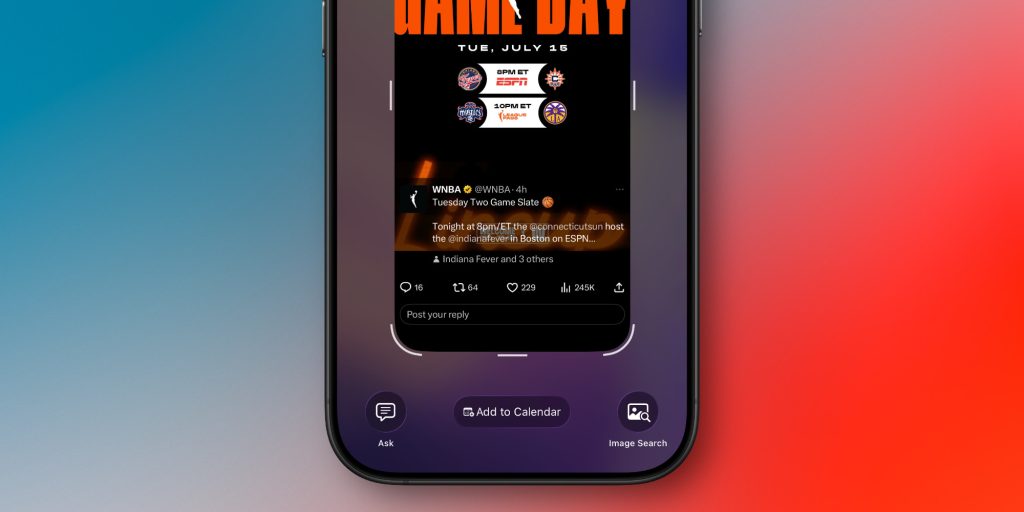
    screenshot calendar ios 26

    Now that adding something to calendar is as easy as taking a screenshot, I’ve been using calendar for far more. It particularly came in handy during CES, when I had many different events to bounce around.

    I’ve also found that this feature works remarkably well. Whether you’re screenshotting an Instagram story, an email, or a website, I’m yet to see it fail to pull out the relevant details and turn it into a calendar event.

    All you have to do is take a screenshot and tap the little add to calendar button at the bottom. You’ll read over the details, then you can just add it. It’s really that simple.


    My favorite Apple accessory recommendations:

    Follow Michael: X/Twitter, Bluesky, Instagram

    Add 9to5Mac as a preferred source on Google
    Add 9to5Mac as a preferred source on Google

    FTC: We use income earning auto affiliate links. More.

    dbrand iPhone 17 Series Grip Banner


    Source link

    AllTime Apple favorites Feature Intelligence iOS
    Follow on Google News Follow on Flipboard
    Share. Facebook Twitter Pinterest LinkedIn Tumblr Email Copy Link
    tonirufai
    big tee tech hub
    • Website

    Related Posts

    Captcha scam spreads online, tricking Mac users with malware

    March 11, 2026

    uikit – Why the title doesn’t follow the navigation inline state in iOS 26

    March 11, 2026

    Apple creates adorable little Finder guy to promote its adorable little Mac

    March 10, 2026
    Add A Comment
    Leave A Reply Cancel Reply

    Editors Picks

    Setting Up a Google Colab AI-Assisted Coding Environment That Actually Works

    March 11, 2026

    The economics of enterprise AI: What the Forrester TEI study reveals about Microsoft Foundry

    March 11, 2026

    The search for new bosons beyond Higgs – Physics World

    March 11, 2026

    Amazon is linking site hiccups to AI efforts

    March 11, 2026
    About Us
    About Us

    Welcome To big tee tech hub. Big tee tech hub is a Professional seo tools Platform. Here we will provide you only interesting content, which you will like very much. We’re dedicated to providing you the best of seo tools, with a focus on dependability and tools. We’re working to turn our passion for seo tools into a booming online website. We hope you enjoy our seo tools as much as we enjoy offering them to you.

    Don't Miss!

    Setting Up a Google Colab AI-Assisted Coding Environment That Actually Works

    March 11, 2026

    The economics of enterprise AI: What the Forrester TEI study reveals about Microsoft Foundry

    March 11, 2026

    Subscribe to Updates

    Get the latest technology news from Bigteetechhub about IT, Cybersecurity and Big Data.

      • About Us
      • Contact Us
      • Disclaimer
      • Privacy Policy
      • Terms and Conditions
      © 2026 bigteetechhub.All Right Reserved

      Type above and press Enter to search. Press Esc to cancel.
