


[ad_1]
Hackers have a new tool called ClickFix. The new attack vector combines fake human-verification prompts with malware, trying to trick users into running Terminal commands that bypass macOS security.
The tactic, known as ClickFix, disguises malware delivery as a routine human verification step. Victims are instructed to open tools like Terminal or a command prompt and paste a command to complete verification.
Running the command installs malicious software on the system. Stolen data can include passwords, browser information, and cryptocurrency wallets.
Security analysts say the technique is spreading quickly through compromised websites, malicious advertisements, and phishing campaigns.
CAPTCHAs are designed to distinguish human users from automated bots and have become a common part of browsing the web. Many sites rely on verification systems such as Cloudflare security checks or Google reCAPTCHA to filter automated traffic.
Attackers exploit users’ familiarity with these security screens. Fake verification pages appear after visiting compromised websites or clicking malicious ads.
Instead of asking users to identify images or check a box, the page instructs visitors to open a system tool and paste a command into it. Running the command downloads malware from a remote server and executes it locally on the victim’s device.
ClickFix fake CAPTCHA attacks are spreading rapidly across the web
Security researchers first identified ClickFix campaigns in 2024 as attackers began experimenting with copy-and-paste malware delivery methods.
Unlike older malware campaigns that relied on downloads or attachments, ClickFix convinces victims to run malicious commands themselves. Eliminating obvious downloads has helped the tactic spread quickly across compromised websites and phishing campaigns.
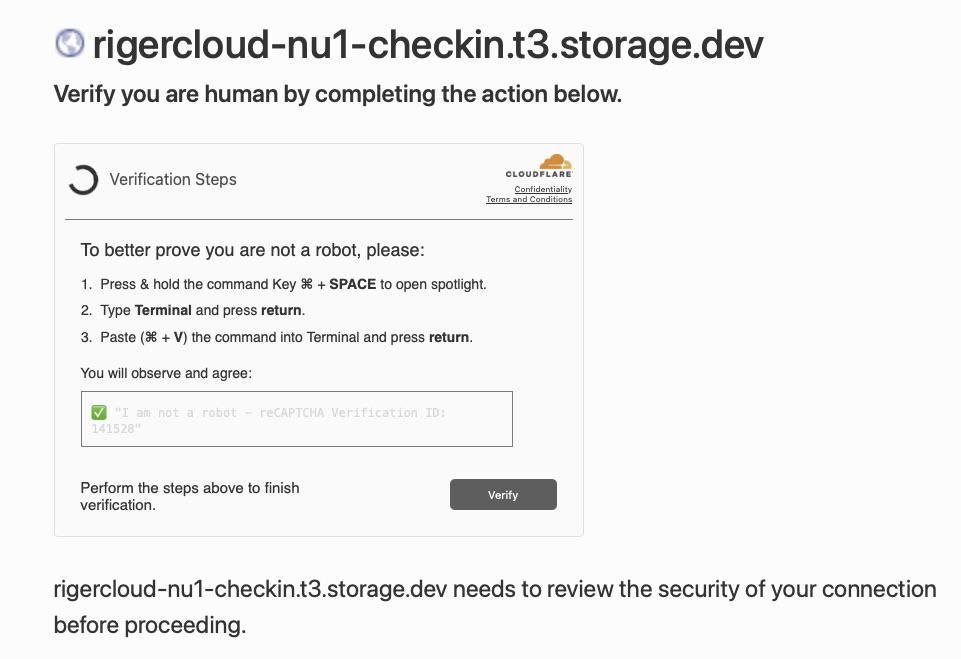
A screenshot of the malicious CAPTCHA. Image credit: Reddit
Researchers say detections of ClickFix-style attacks surged by more than 500% between 2024 and 2025. Security analysts now consider it one of the fastest-growing social engineering threats on the internet.
Recent campaigns have become more sophisticated, using countdown timers and video instructions in fake CAPTCHA pages to guide victims. Others use JavaScript to copy malicious commands to a user’s clipboard, increasing the likelihood of infection.
Although early ClickFix campaigns focused on Windows systems, researchers now report variants designed specifically for macOS devices. Some malicious pages detect a visitor’s operating system and display instructions tailored to Mac users.
The prompts commonly instruct victims to press Command-Space to open Spotlight, launch Terminal, and paste a command copied from the web page.
Once executed, the command can install information-stealing malware such as Atomic macOS Stealer. The malware can harvest browser credentials, cookies, and cryptocurrency wallet data from infected Macs.
Macs aren’t immune to attacks because they rely on user behavior rather than software vulnerabilities. While macOS security protections can prevent infection, they won’t stop a user from deliberately running a malicious command.
Why ClickFix fake CAPTCHA scams bypass many security defenses
Traditional malware detection often focuses on blocking suspicious downloads or exploit activity. ClickFix campaigns avoid many of those signals by shifting the final execution step to the user.
Security researchers describe the tactic as a form of social engineering that exploits trust in routine system prompts. Victims end up executing the attacker’s code themselves.
Many attacks rely on legitimate system utilities such as PowerShell or Terminal to run commands, a technique often called “living off the land.” Attackers use those built-in tools instead of custom malware loaders.
CAPTCHA pages appearing across the web are tricking Mac users
Security software may treat the activity as normal because the commands run inside trusted system utilities.
How to stay safe from fake CAPTCHA malware and ClickFix scams
We know that most AppleInsider users probably won’t fall for this. We guarantee you know somebody that will.
Tell them that the most reliable warning sign is simple. Legitimate CAPTCHA systems never ask users to open Terminal, PowerShell, or any other command interface and paste commands to complete verification.
A verification prompt that instructs you to run commands or paste text into a system tool is almost certainly malicious. Closing the page immediately is the safest response.
Fake CAPTCHA scams often appear on compromised websites, malicious ads, or phishing pages designed to imitate legitimate security checks. Avoid interacting with unexpected verification prompts or suspicious pop-ups.
Updating browsers and operating systems reduces exposure to malicious sites, while modern security tools block known threats. Awareness is the most effective defense, as ClickFix attacks rely on deception rather than software vulnerabilities.
[ad_2]
Source link
