


[ad_1]
I use my webcam constantly for streaming and I’m pretty familiar with all the internals and how the camera model on Windows works. I also use OBS extensively, so I regularly use the OBS virtual camera and flow everything through Open Broadcasting Studio.
For my podcast, I use Zencastr which is a web-based app that talks to the webcam via the browser APIs. For YouTubes, I’ll use Riverside or StreamYard, also webapps.
I’ve done this reliably for the last several years without any trouble. Yesterday, I started seeing the most weird thing and it was absolutely perplexing and almost destroyed the day. I started seeing regular pauses in my webcam stream but only in two instances.
- The webcam would pause for 10-15 seconds every 90 or so seconds when access the Webcam in a browser
- I would see a long pause/hang in OBS when double clicking on my Video Source (Webcam) to view its properties
Micah initially said USB but my usb bus and hubs have worked reliably for years. Thought something might have changed in my El Gato capture device, but that has also been rock solid for 1/2 a decade. Then I started exploring virtual cameras and looked in the windows camera dialog under settings for a list of all virtual cameras.
Interestingly, virtual cameras don’t get listed under Cameras in Settings in Windows:
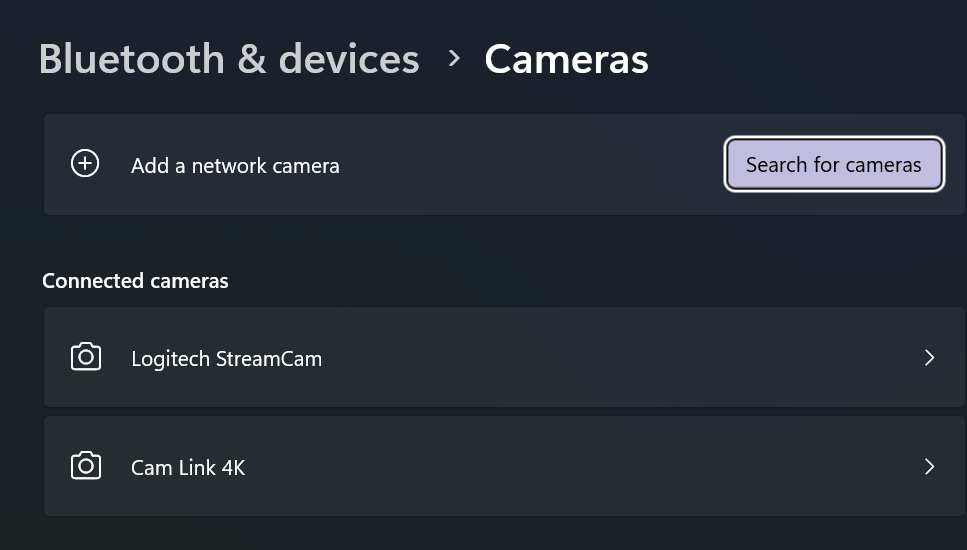
From what I can tell, there’s no user interface to list out all of your cameras – virtual or otherwise – in windows.
Here’s a quick PowerShell script you can run to list out anything ‘connected’ that also includes the string “cam” in your local devices
Get-CimInstance -Namespace root\cimv2 -ClassName Win32_PnPEntity |
Where-Object { $_.Name -match 'Cam' } |
Select-Object Name, Manufacturer, PNPDeviceID
and my output
Name                                     Manufacturer        PNPDeviceID
----                                     ------------        -----------
Cam Link 4K                              Microsoft           USB\VID_0FD9&PID_0066&MI_00\7&3768531A&0&0000
Digital Audio Interface (2- Cam Link 4K) Microsoft           SWD\MMDEVAPI\{0.0.1.00000000}.{AF1690B6-CA2A-4AD3-AAFD-8DDEBB83DD4A}
Logitech StreamCam WinUSB                Logitech            USB\VID_046D&PID_0893&MI_04\7&E36D0CF&0&0004
Logitech StreamCam                       (Generic USB Audio) USB\VID_046D&PID_0893&MI_02\7&E36D0CF&0&0002
Logitech StreamCam                       Logitech            USB\VID_046D&PID_0893&MI_00\7&E36D0CF&0&0000
Remote Desktop Camera Bus                Microsoft           UMB\UMB\1&841921D&0&RDCAMERA_BUS
Cam Link 4K                              (Generic USB Audio) USB\VID_0FD9&PID_0066&MI_03\7&3768531A&0&0003
Windows Virtual Camera Device            Microsoft           SWD\VCAMDEVAPI\B486E21F1D4BC97087EA831093E840AD2177E046699EFBF62B27304F5CCAEF57
However, when I list out my cameras using JavaScript enumerateDevices() like this
// Put variables in global scope to make them available to the browser console.
async function listWebcams() {
try {
const devices = await navigator.mediaDevices.enumerateDevices();
const webcams = devices.filter(device => device.kind === 'videoinput');if (webcams.length > 0) {
console.log("Connected webcams:");
webcams.forEach((webcam, index) => {
console.log(`${index + 1}. ${webcam.label || `Camera ${index + 1}`}`);
});
} else {
console.log("No webcams found.");
}
} catch (error) {
console.error("Error accessing media devices:", error);
}
}
listWebcams();
I would get:
Connected webcams:
test.html:11 1. Logitech StreamCam (046d:0893)
test.html:11 2. OBS Virtual Camera (Windows Virtual Camera)
test.html:11 3. Cam Link 4K (0fd9:0066)
test.html:11 4. LSVCam
test.html:11 5. OBS Virtual Camera
So, what, what’s LSVCam? And depending on how I’d call it I’d get the pause and
getUserMedia error: NotReadableError NotReadableError: Could not start video source
Some apps could see this LSVCam and others couldn’t. OBS really dislikes it, browsers really dislike it and it seemed to HANG on enumeration of cameras. Why can parts of Windows see this camera and others can’t?
I don’t know. Do you?
Regardless, it turns that it appears once in my registry, here (this is a dump of the key, you just care about the Registry PATH)
Windows Registry Editor Version 5.00[HKEY_CLASSES_ROOT\CLSID\{860BB310-5D01-11d0-BD3B-00A0C911CE86}\Instance\LSVCam]
"FriendlyName"="LSVCam"
"CLSID"="{BA80C4AD-8AED-4A61-B434-481D46216E45}"
"FilterData"=hex:02,00,00,00,00,00,20,00,01,00,00,00,00,00,00,00,30,70,69,33,\
08,00,00,00,00,00,00,00,01,00,00,00,00,00,00,00,00,00,00,00,30,74,79,33,00,\
00,00,00,38,00,00,00,48,00,00,00,76,69,64,73,00,00,10,00,80,00,00,aa,00,38,\
9b,71,00,00,00,00,00,00,00,00,00,00,00,00,00,00,00,00
If you want to get rid of it, delete HKEY_CLASSES_ROOT\CLSID\{860BB310-5D01-11d0-BD3B-00A0C911CE86}\Instance\LSVCam
WARNING: DO NOT delete the \Instance, just the LSVCam and below. I am a random person on the internet and you got here by googling, so if you mess up your machine by going into RegEdit.exe, I’m sorry to this man, but it’s above me now.
Where did LSVCam.dll come from, you may ask? TikTok Live Studio, baby. Live Studio Video/Virtual Cam, I am guessing.
Directory of C:\Program Files\TikTok LIVE Studio\0.67.2\resources\app\electron\sdk\lib\MediaSDK_V109/18/2024  09:20 PM           218,984 LSVCam.dll
1 File(s)        218,984 bytes
This is a regression that started recently for me, so it’s my opinion that they are installing a virtual camera for their game streaming feature but they are doing it poorly. It’s either not completely installed, or hangs on enumeration, but the result is you’ll see hangs on camera enumeration in your apps, especually browser apps that poll for cameras changes or check on a timer.
Nothing bad will happen if you delete the registry key BUT it’ll show back up when you run TikTok Studio again. I still stream to TikTok, I just delete this key each time until someone on the TikTok Studio development team sees this blog post.
Hope this helps!
About Scott
Scott Hanselman is a former professor, former Chief Architect in finance, now speaker, consultant, father, diabetic, and Microsoft employee. He is a failed stand-up comic, a cornrower, and a book author.



[ad_2]
Source link
