
Close Menu
  • Home
  • AI
  • Big Data
  • Cloud Computing
  • iOS Development
  • IoT
  • IT/ Cybersecurity
  • Tech
    • Nanotechnology
    • Green Technology
    • Apple
    • Software Development
    • Software Engineering

Subscribe to Updates

Get the latest technology news from Bigteetechhub about IT, Cybersecurity and Big Data.

    What's Hot

    WhatsApp introduces parent-managed accounts for pre-teens

    March 11, 2026

    Sacramento beauty queen admits $10M investment fraud funding gambling and trips

    March 11, 2026

    Setting Up a Google Colab AI-Assisted Coding Environment That Actually Works

    March 11, 2026
    Facebook X (Twitter) Instagram
    Facebook X (Twitter) Instagram
    Big Tee Tech Hub
    • Home
    • AI
    • Big Data
    • Cloud Computing
    • iOS Development
    • IoT
    • IT/ Cybersecurity
    • Tech
      • Nanotechnology
      • Green Technology
      • Apple
      • Software Development
      • Software Engineering
    Big Tee Tech Hub
    Home»Software Development»GitHub Copilot for CLI for PowerShell
    Software Development

    GitHub Copilot for CLI for PowerShell

    big tee tech hubBy big tee tech hubMay 29, 2025012 Mins Read
    Share Facebook Twitter Pinterest Copy Link LinkedIn Tumblr Email Telegram WhatsApp
    Follow Us
    Google News Flipboard
    GitHub Copilot for CLI for PowerShell
    Share
    Facebook Twitter LinkedIn Pinterest Email Copy Link


    GitHub Next has this cool project that is basically Copilot for the CLI (command line interface). You can sign up for their waitlist at the Copilot for CLI site.

    Copilot for CLI provides three shell commands: ??, git? and gh?

    This is cool and all, but I use PowerShell. Turns out these ?? commands are just router commands to a larger EXE called github-copilot-cli. So if you go “?? something” you’re really going “github-copilot-cli what-the-shell something.”

    So this means I should be able to to do the same/similar aliases for my PowerShell prompt AND change the injected prompt (look at me I’m a prompt engineer) to add ‘use powershell to.’

    Now it’s not perfect, but hopefully it will make the point to the Copilot CLI team that PowerShell needs love also.

    Here are my aliases. Feel free to suggest if these suck. Note the addition of “user powershell to” for the ?? one. I may make a ?? and a p? where one does bash and one does PowerShell. I could also have it use wsl.exe and shell out to bash. Lots of possibilities.

    function ?? { 
    $TmpFile = New-TemporaryFile
    github-copilot-cli what-the-shell ('use powershell to ' + $args) --shellout $TmpFile
    if ([System.IO.File]::Exists($TmpFile)) {
    $TmpFileContents = Get-Content $TmpFile
    if ($TmpFileContents -ne $nill) {
    Invoke-Expression $TmpFileContents
    Remove-Item $TmpFile
    }
    }
    }

    function git? {
    $TmpFile = New-TemporaryFile
    github-copilot-cli git-assist $args --shellout $TmpFile
    if ([System.IO.File]::Exists($TmpFile)) {
    $TmpFileContents = Get-Content $TmpFile
    if ($TmpFileContents -ne $nill) {
    Invoke-Expression $TmpFileContents
    Remove-Item $TmpFile
    }
    }
    }
    function gh? {
    $TmpFile = New-TemporaryFile
    github-copilot-cli gh-assist $args --shellout $TmpFile
    if ([System.IO.File]::Exists($TmpFile)) {
    $TmpFileContents = Get-Content $TmpFile
    if ($TmpFileContents -ne $nill) {
    Invoke-Expression $TmpFileContents
    Remove-Item $TmpFile
    }
    }
    }

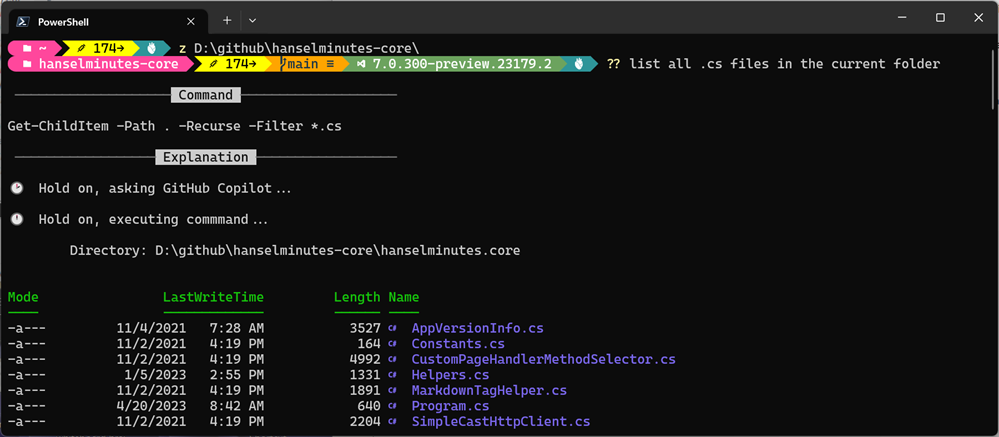
    It also then offers to run the command. Very smooth.
    image

    Hope you like it. Lots of fun stuff happening in this space.


    About Scott

    Scott Hanselman is a former professor, former Chief Architect in finance, now speaker, consultant, father, diabetic, and Microsoft employee. He is a failed stand-up comic, a cornrower, and a book author.

    facebook
    bluesky
    subscribe
    About   Newsletter

    Hosting By
    Hosted on Linux using .NET in an Azure App Service


    Source link

    CLI Copilot GitHub PowerShell
    Follow on Google News Follow on Flipboard
    Share. Facebook Twitter Pinterest LinkedIn Tumblr Email Copy Link
    tonirufai
    big tee tech hub
    • Website

    Related Posts

    React Native vs Flutter: An overview and 6 decision factors

    March 11, 2026

    Anthropic brings code review into Claude Code

    March 10, 2026

    A Guide to Product Information Management

    March 9, 2026
    Add A Comment
    Leave A Reply Cancel Reply

    Editors Picks

    WhatsApp introduces parent-managed accounts for pre-teens

    March 11, 2026

    Sacramento beauty queen admits $10M investment fraud funding gambling and trips

    March 11, 2026

    Setting Up a Google Colab AI-Assisted Coding Environment That Actually Works

    March 11, 2026

    The economics of enterprise AI: What the Forrester TEI study reveals about Microsoft Foundry

    March 11, 2026
    About Us
    About Us

    Welcome To big tee tech hub. Big tee tech hub is a Professional seo tools Platform. Here we will provide you only interesting content, which you will like very much. We’re dedicated to providing you the best of seo tools, with a focus on dependability and tools. We’re working to turn our passion for seo tools into a booming online website. We hope you enjoy our seo tools as much as we enjoy offering them to you.

    Don't Miss!

    WhatsApp introduces parent-managed accounts for pre-teens

    March 11, 2026

    Sacramento beauty queen admits $10M investment fraud funding gambling and trips

    March 11, 2026

    Subscribe to Updates

    Get the latest technology news from Bigteetechhub about IT, Cybersecurity and Big Data.

      • About Us
      • Contact Us
      • Disclaimer
      • Privacy Policy
      • Terms and Conditions
      © 2026 bigteetechhub.All Right Reserved

      Type above and press Enter to search. Press Esc to cancel.
