
Close Menu
  • Home
  • AI
  • Big Data
  • Cloud Computing
  • iOS Development
  • IoT
  • IT/ Cybersecurity
  • Tech
    • Nanotechnology
    • Green Technology
    • Apple
    • Software Development
    • Software Engineering

Subscribe to Updates

Get the latest technology news from Bigteetechhub about IT, Cybersecurity and Big Data.

    What's Hot

    Professional Community Investment Yields Big Returns

    March 13, 2026

    From transparency to action: What the latest Microsoft email security benchmark reveals

    March 13, 2026

    Launch of DevNet Content Search MCP Server

    March 13, 2026
    Facebook X (Twitter) Instagram
    Facebook X (Twitter) Instagram
    Big Tee Tech Hub
    • Home
    • AI
    • Big Data
    • Cloud Computing
    • iOS Development
    • IoT
    • IT/ Cybersecurity
    • Tech
      • Nanotechnology
      • Green Technology
      • Apple
      • Software Development
      • Software Engineering
    Big Tee Tech Hub
    Home»Software Development»Microsoft adds Copilot-powered debugging features for .NET in Visual Studio
    Software Development

    Microsoft adds Copilot-powered debugging features for .NET in Visual Studio

    big tee tech hubBy big tee tech hubAugust 22, 2025032 Mins Read
    Share Facebook Twitter Pinterest Copy Link LinkedIn Tumblr Email Telegram WhatsApp
    Follow Us
    Google News Flipboard
    Microsoft adds Copilot-powered debugging features for .NET in Visual Studio
    Share
    Facebook Twitter LinkedIn Pinterest Email Copy Link


    Copilot debuggingCopilot debugging

    Microsoft has been adding several new diagnostics features to Copilot in Visual Studio for .NET to make the debugging process easier.

    “The same tools you rely on are now able to keep up with you, identify issues more quickly, offer context-smart fixes, and help you move from asking ‘why is this broken?’ to ‘oh, I see and here’s the fix’ in a fraction of the time,” Harshada Hole, senior product manager for Visual Studio Debugging, Profiling, and Diagnostics, wrote in a blog post.

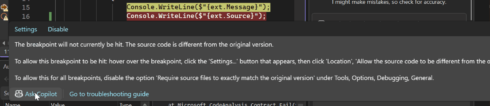
    Copilot can now suggest appropriate locations for breakpoints and tracepoints based on current context. Similarly, it can troubleshoot non-binding breakpoints and walk developers through the potential cause, such as mismatched symbols or incorrect build configurations.

    Another new feature is the ability to generate LINQ queries on massive collections in the IEnumerable Visualizer, which renders data into a sortable, filterable tabular view. For example, a developer could ask for a LINQ query that will surface problematic rows causing a filter issue. Additionally, developers can hover over any LINQ statement and get an explanation from Copilot on what it’s doing, evaluate it in context, and highlight potential inefficiencies.

    Copilot can also now help developers deal with exceptions by summarizing the error, identifying potential causes, and offering targeted code fix suggestions.

    Additionally, to help developers resolve performance issues, Microsoft introduced Auto Insights, which shows where the application is using the most CPU and offers suggestions on how to fix those bottlenecks. A similar feature is available in the Instrumentation tool and .NET Allocation tool to identify zero-length array allocations.

    Other new Copilot-powered debugging features include the ability to hover over a variable in DataTips, Autos, or Locals to get potential causes of unexpected results; return value analysis; and generation of thread summaries for each stack when working in Parallel Stacks.

    “This isn’t about replacing your debugging skills, it’s about cutting out the repetitive, tedious work so you can focus on what really matters: solving problems and shipping features. Copilot surfaces the right information in context, exactly when you need it. Think of it as having a knowledgeable pair programmer inside your Visual Studio that helps you move faster, understand code more clearly, and catch issues before they slow you down,” Hole wrote.


    Source link

    .NET Adds Copilotpowered debugging Features Microsoft Studio Visual
    Follow on Google News Follow on Flipboard
    Share. Facebook Twitter Pinterest LinkedIn Tumblr Email Copy Link
    tonirufai
    big tee tech hub
    • Website

    Related Posts

    From transparency to action: What the latest Microsoft email security benchmark reveals

    March 13, 2026

    The $1.6 Million Weekend: Why Simple API Gateways Fail in the Agentic Era

    March 13, 2026

    Adobe InDesign Plugin Development Guide: APIs, Scripts, and Automation

    March 12, 2026
    Add A Comment
    Leave A Reply Cancel Reply

    Editors Picks

    Professional Community Investment Yields Big Returns

    March 13, 2026

    From transparency to action: What the latest Microsoft email security benchmark reveals

    March 13, 2026

    Launch of DevNet Content Search MCP Server

    March 13, 2026

    The Easiest Way to Test Batteries

    March 13, 2026
    About Us
    About Us

    Welcome To big tee tech hub. Big tee tech hub is a Professional seo tools Platform. Here we will provide you only interesting content, which you will like very much. We’re dedicated to providing you the best of seo tools, with a focus on dependability and tools. We’re working to turn our passion for seo tools into a booming online website. We hope you enjoy our seo tools as much as we enjoy offering them to you.

    Don't Miss!

    Professional Community Investment Yields Big Returns

    March 13, 2026

    From transparency to action: What the latest Microsoft email security benchmark reveals

    March 13, 2026

    Subscribe to Updates

    Get the latest technology news from Bigteetechhub about IT, Cybersecurity and Big Data.

      • About Us
      • Contact Us
      • Disclaimer
      • Privacy Policy
      • Terms and Conditions
      © 2026 bigteetechhub.All Right Reserved

      Type above and press Enter to search. Press Esc to cancel.