


[ad_1]
Amazon SageMaker provides a single data and AI development environment to discover and build with your data. This unified platform integrates functionality from existing AWS Analytics and Artificial Intelligence and Machine Learning (AI/ML) services, including Amazon EMR, AWS Glue, Amazon Athena, Amazon Redshift, and Amazon Bedrock.
Organizations need to efficiently manage data assets while maintaining governance controls in their data marketplaces. Although manual approval workflows remain important for sensitive datasets and production systems, there’s an increasing need for automated approval processes with less sensitive datasets. In this post, we show you how to automate subscription request approvals within SageMaker, accelerating data access for data consumers.
Prerequisites
For this walkthrough, you must have the following prerequisites:
- An AWS account – If you don’t have an account, you can create one. The account should have permission to do the following:
- Create and manage SageMaker domains
- Create and manage IAM roles
- Create and invoke Lambda functions
- SageMaker domain – For instructions to create a domain, refer to Create an Amazon SageMaker Unified Studio domain – quick setup.
- A demo project – Create a demo project in your SageMaker domain. For instructions, see Create a project. For this example, we choose All capabilities in the project profile section.
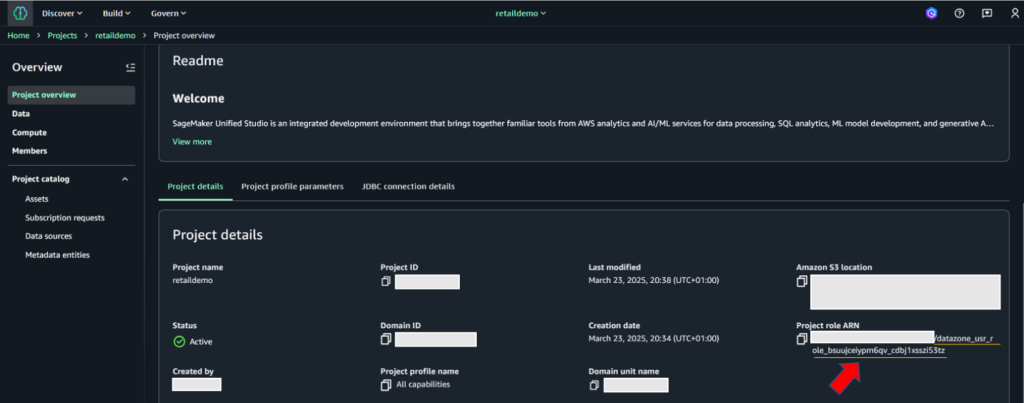
- SageMaker domain ID, project ID, and project role ARN – These will be used in later steps to provide permissions for existing datasets and resources, and automatic subscription approval code. To retrieve this information, go to the Project details tab on the project details page on the SageMaker console.

- AWS CLI installed – You must have the AWS Command Line Interface (AWS CLI) version 2.11 or later.
- Python installed – You must have Python version 3.8 or later.
- IAM permissions – Sign in as the user with administrative access
- Lambda permissions – Configure the appropriate IAM permissions for the Lambda execution role. The following code is a sample role used for testing this solution. Before implementing this IAM policy in your environment, provide the values for your specific AWS Region and account ID. Adjust them based on the principle of least privilege. To learn more about creating Lambda execution roles, refer to Defining Lambda function permissions with an execution role.
Solution overview
Understanding the subscription and approval workflow in Amazon SageMaker is important before diving deep into custom workflow solution. After an asset is published to the SageMaker catalog, data consumers can discover assets. When a data consumer discovers assets in SageMaker catalog, they request access to the asset, by submitting a subscription request with business justification and intended use case. The request enters a pending state and notifies the data producer or asset owner for review. The data producer evaluates the request based on governance policies, consumer credentials, and business context. The data producer can accept, reject, or request additional information from the data consumer. Upon acceptance, SageMaker triggers the AcceptSubscriptionRequest event and begins automated access provisioning. After a subscription is accepted, a subscription fulfilment process gets kicked off to facilitate access to the asset, for the data producer. SageMaker integrates deeply with AWS Lake Formation to manage fine-grained permissions. When a subscription is approved, SageMaker automatically calls Lake Formation APIs to grant specific database, table, and column-level permissions to the subscriber’s IAM role. Lake Formation acts as the central permission engine, translating subscription approvals into actual data access rights without manual intervention. The system provisions and updates resource-based policies on data sources. Once the provisioning completes, the data consumer can immediately access subscribed data through query engines like Athena, Redshift, or EMR, with Lake Formation enforcing permissions at query time.
By default, subscription requests to a published asset require manual approval by a data owner. However, Amazon SageMaker supports automatic approval of subscription requests at asset level: when publishing a data asset, you can choose to not require subscription approval. In this case, all incoming subscription requests to that asset are automatically approved. Let’s first outline the step-by-step process for disabling automatic approval at the asset level.
Configure automatic approval at asset level:
To configure automatic approval, data producers can follow the steps below.
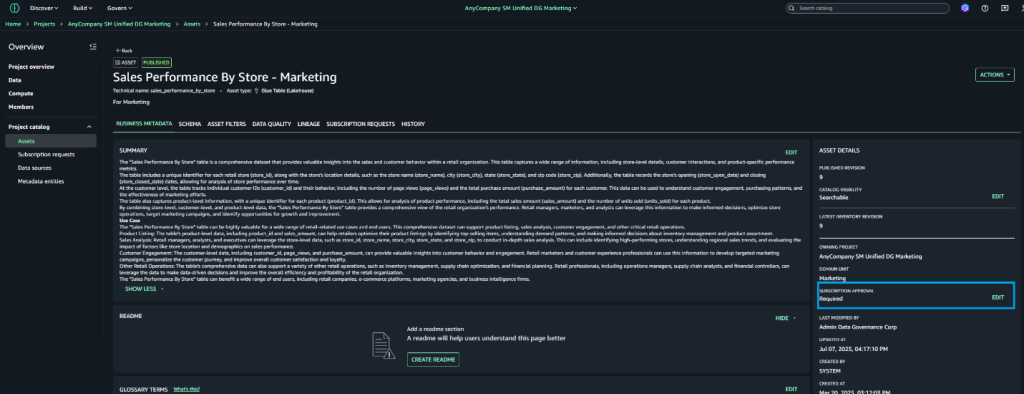
- Log in to SageMaker Unified Studio portal as data producer. Navigate to Assets and select the target asset
- Choose Assets → Pick the asset, which you would like to configure for automatic approval.
- On the asset details page, locate Edit Subscription settings in the right pane.
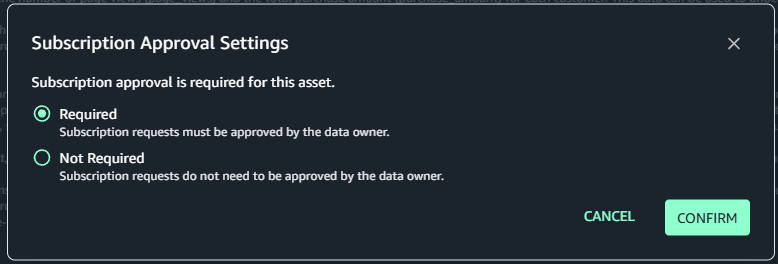
- Choose Edit next to Subscription Required
- Select Not Required in the dialogue box
- Confirm your selection
Customize SageMaker’s subscription workflow:
While manual approval workflow remains essential for production environments and sensitive data handling, organizations seek to streamline and automate approvals for lower-risk environments and non-sensitive datasets. To achieve this project-level automation, we can enhance SageMaker’s native approval workflow through a custom event-driven solution. This solution leverages AWS’s serverless architecture, combining using AWS Lambda, Amazon EventBridge rules, and Amazon Simple Notification Service (Amazon SNS) to create an automated approval workflow. This customization allows organizations to maintain governance while reducing administrative overhead and accelerating the development cycle in non-critical environments. The event-driven approach ensures real-time processing of approval requests, maintains audit trails, and can be configured to apply different approval rules based on project characteristics and data sensitivity levels.
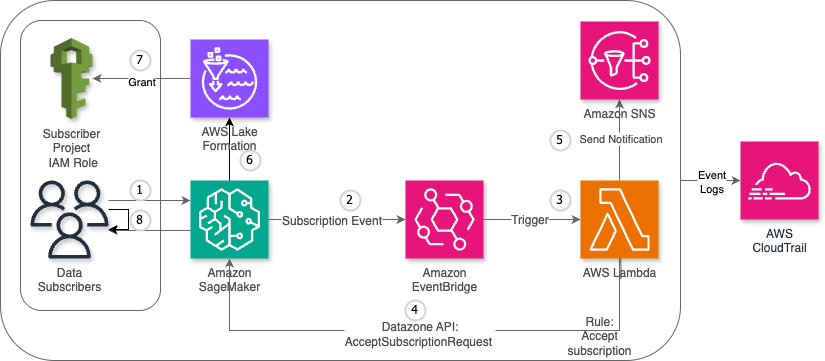
The custom workflow consists of the following steps:
- The data consumer submits a subscription request for a published data asset.
- SageMaker detects the request and generates a subscription event, which is automatically sent to EventBridge.
- EventBridge triggers the designated Lambda function.
- The Lambda function sends an
AcceptSubscriptionRequestAPI call to SageMaker. - The function also sends a notification through Amazon SNS.
- AWS Lake Formation processes the approved subscription and updates the relevant access control lists (ACLs) and permission sets.
- Lake Formation grants access permissions to the data consumer’s project AWS Identity and Access Management (IAM) role.
- The data consumer now has authorized access to the requested data asset and can begin working with the subscribed data.
The following diagram illustrates the high-level architecture of the solution.
Key benefits
This solution uses AWS Lambda and Amazon EventBridge to automate SageMaker subscription requests approvals, delivering the following benefits for organizations and end-users:
- Scalability – Automatically handles high volumes of subscription requests
- Cost-efficiency – Pay-as-you-go approach with no idle resource costs
- Minimal maintenance – Serverless components require no infrastructure management
- Flexible triggering – Supports event-driven, scheduled, and manual invocation modes
- Audit compliance – Comprehensive logging and traceability through AWS CloudTrail
Step-by-step procedure
This section outlines the detailed process for implementing a custom subscription request approval workflow in Amazon SageMaker
Create Lambda function
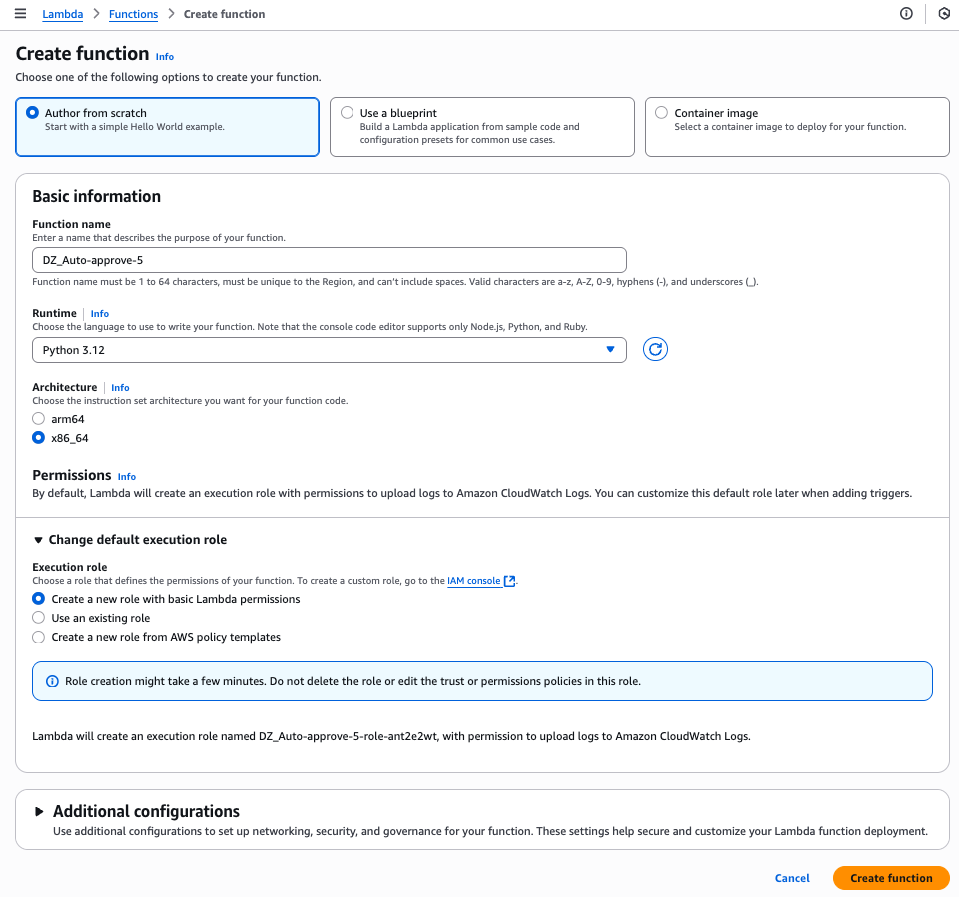
Complete the following steps to create your Lambda function:
- On the Lambda console, choose Functions in the navigation pane.
- Choose Create function.
- Select Author from scratch.
- For Function name, enter a name for the function.
- For Runtime, choose your runtime (for this post, we use Python version 3.9 or later).
- Choose Create function.
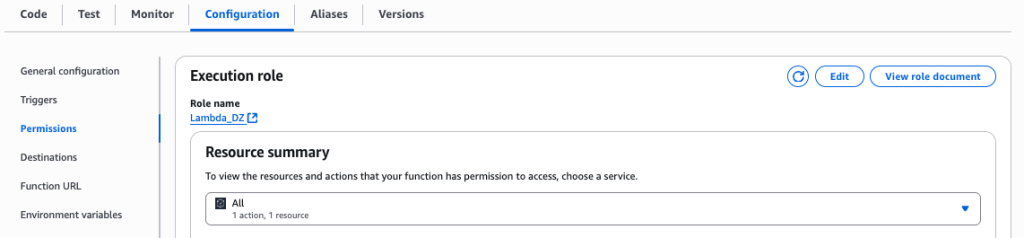
- On the Lambda function page, choose the Configuration tab and then choose Permissions.
- Note the execution role to use when configuring the SageMaker project.
Create SNS topic
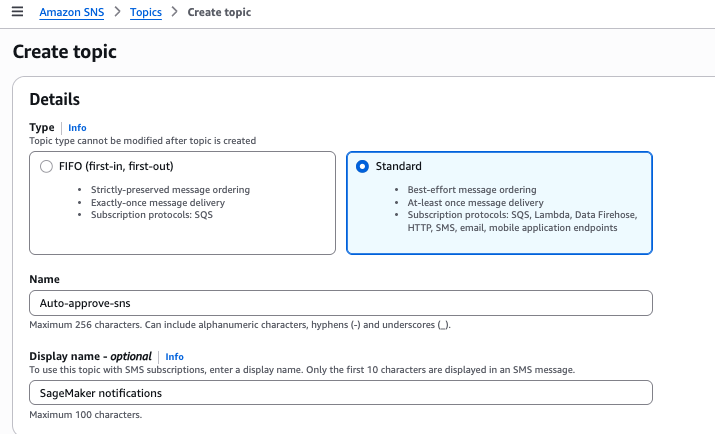
For this solution, we create SNS topic. Complete the following steps to create the SNS topic for automatic approvals:
- On the Amazon SNS console, choose Topics in the navigation pane.
- Choose Create topic.
- For Type, select Standard.
- For Name, enter a name for the topic.
- Choose Create topic.
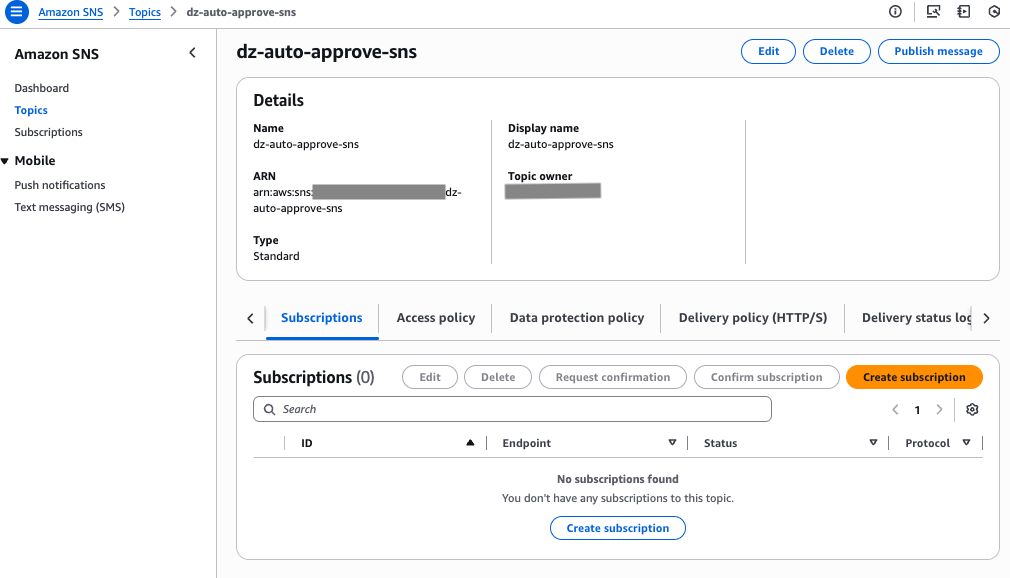
- On the SNS topic details page, note the SNS topic Amazon Resource Name (ARN) to use later in the Lambda function.
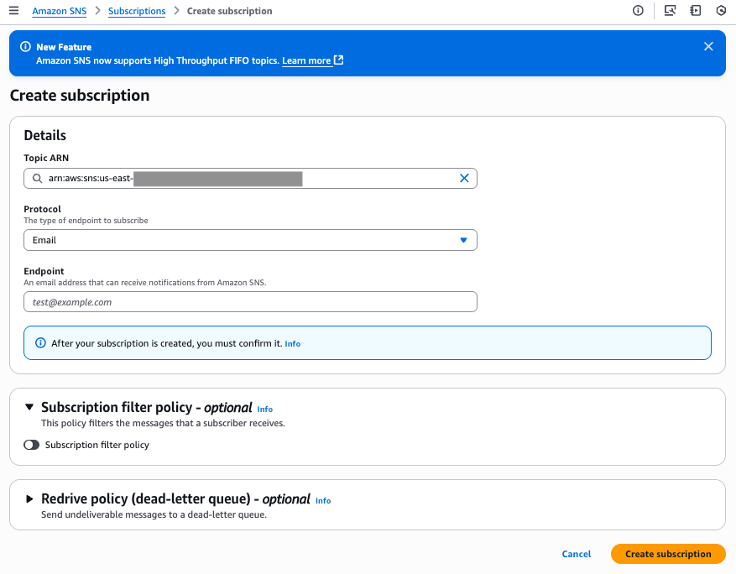
- On Subscription tab, choose Create Subscription.
- For Protocol, choose Email.
- For Endpoint, enter email address of Data consumers.
Create EventBridge rule
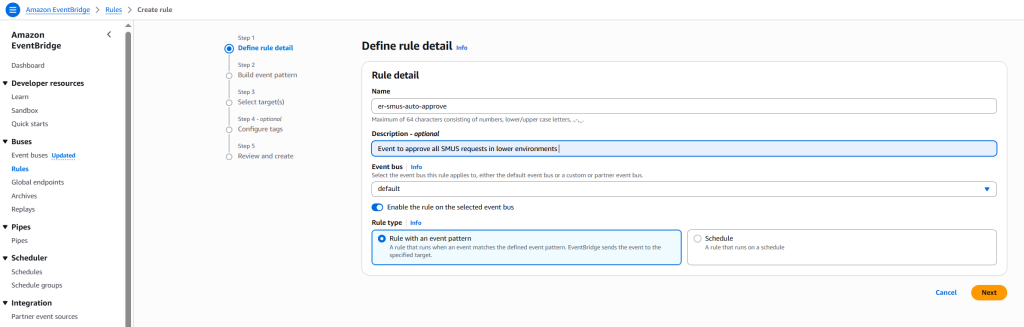
Complete the following steps to create an EventBridge rule to capture subscription request events:
- On the EventBridge console, choose Rules in the navigation pane.
- Choose Create rule.
- For Name, enter a name for the rule.
- For Rule type, select Rule with event pattern.
This option enables the automatic subscription approval workflow to be triggered when a subscription request is initiated. Alternatively, you can select Schedule to schedule the rule to trigger on a regular basis. Refer to Creating a rule that runs on a schedule in Amazon EventBridge to learn more. - Choose Next.
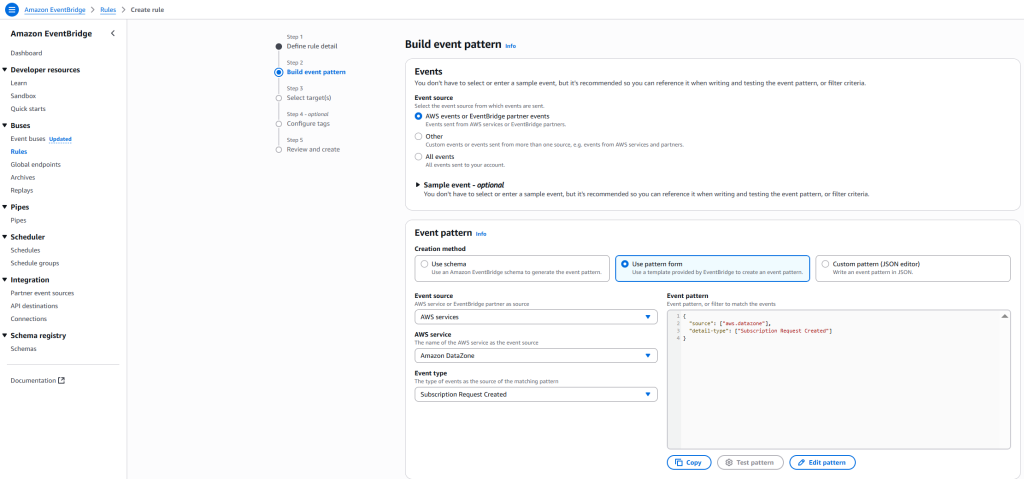
- For Event source, select AWS events or EventBridge partner events.
- For Creation method, select Use pattern form
- For Event source, select AWS services
- For AWS service, select DataZone.
- For Event type, select Subscription Request Created.
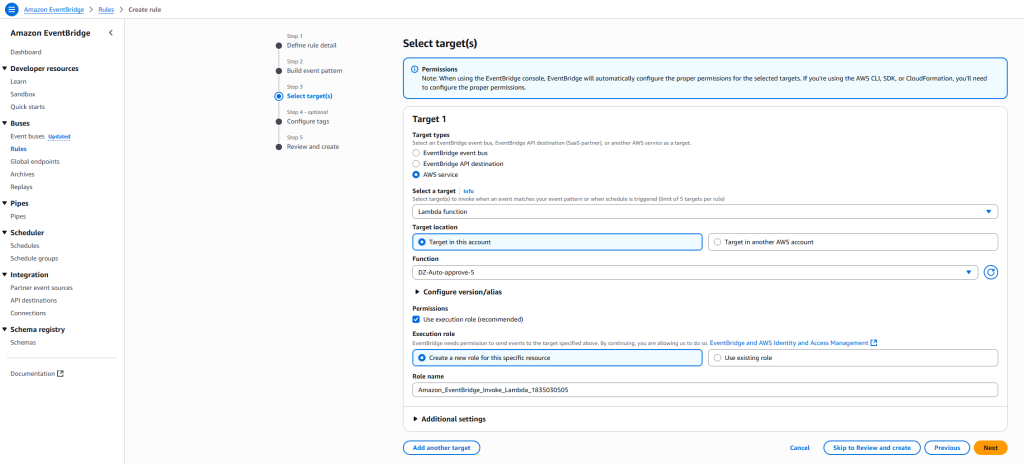
- Configure your target to route events to both the Lambda function and SNS topic.
- Choose Next.
- For this post, skip configuring tags and choose Next.
- Review the settings and choose Create rule.

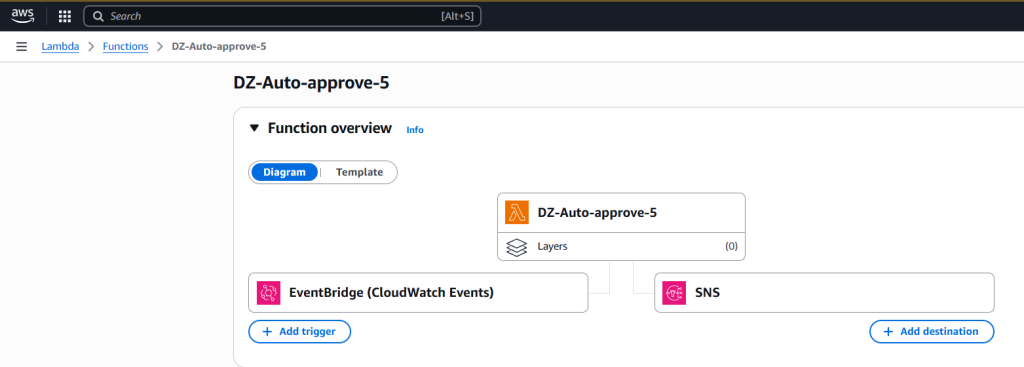
Configure automation workflow
Complete the following steps to configure the automation workflow:
- On the Lambda console, go to the function you created.
- Configure the EventBridge rule to trigger the Lambda function
- Configure the destination as SNS topic for event notification.
Configure code in Lambda function
Complete the following steps to configure your Lambda function:
- On the Lambda console, go to the function you created.
- Add the following code to your function. Provide the domain ID, project ID, and SNS topic ARN that you noted earlier.
- Choose Test to test the Lambda function code. To learn more about testing Lambda code, refer to Testing Lambda functions in the console.
- Choose Deploy to deploy the code.
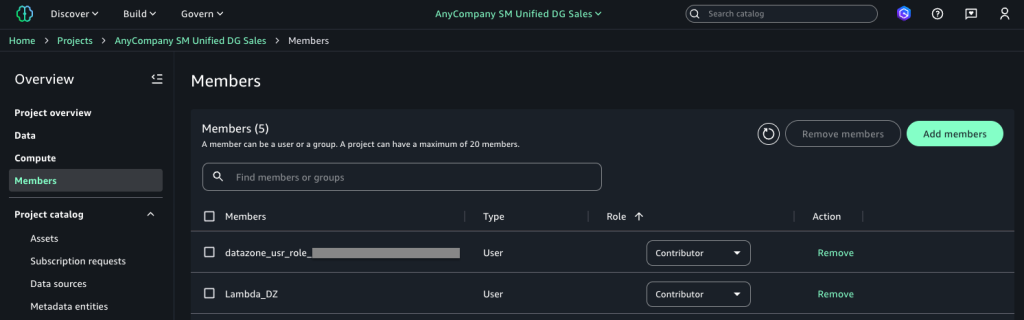
Configure Lambda and project execution roles in SageMaker
Complete the following steps:
- In SageMaker Unified Studio, go to your publishing project.
- Choose Members in the navigation pane.
- Choose Add members.
- Add the Lambda execution role and project execution roles as Contributor.
Test the solution
Complete the following steps to test the solution:
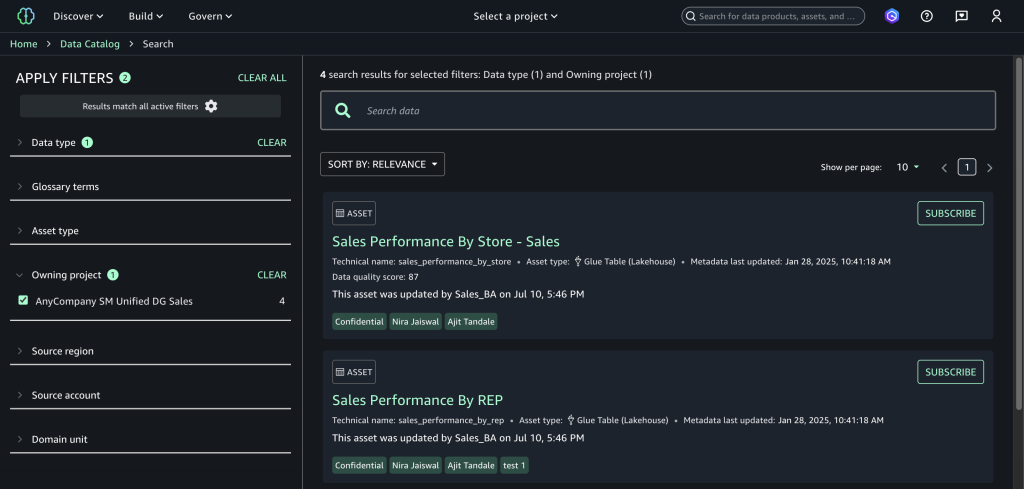
- In SageMaker Unified Studio, navigate to the data catalog and choose Subscribe on the configured asset to initiate a subscription request.
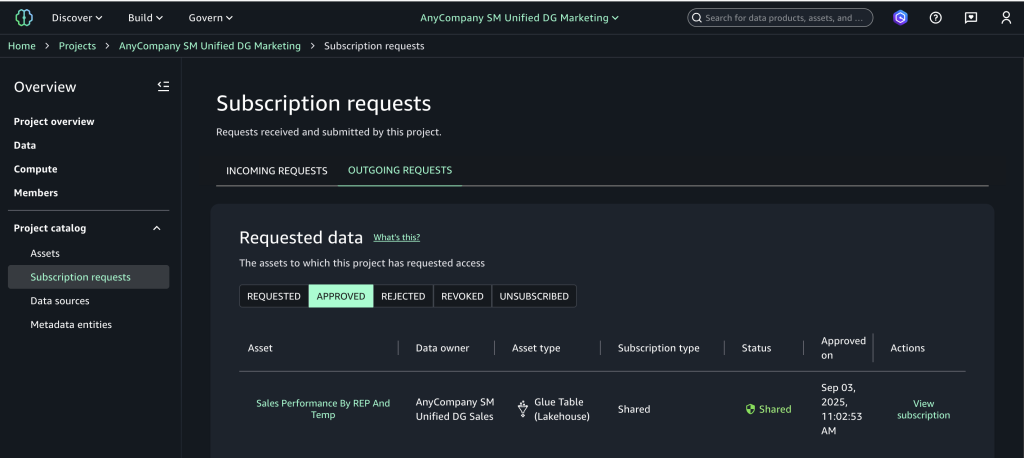
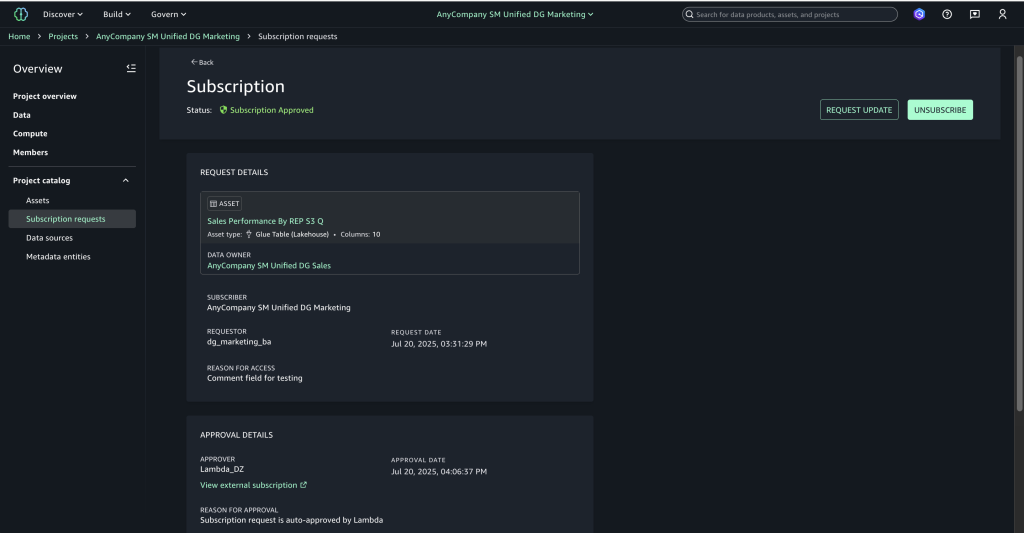
- Choose Subscription requests in the navigation pane to view the outgoing requests and choose the Approved tab to verify automatic approval.
- Choose View subscription to confirm the approver appears as the Lambda execution role with “Auto-approved by Lambda” as the reason.
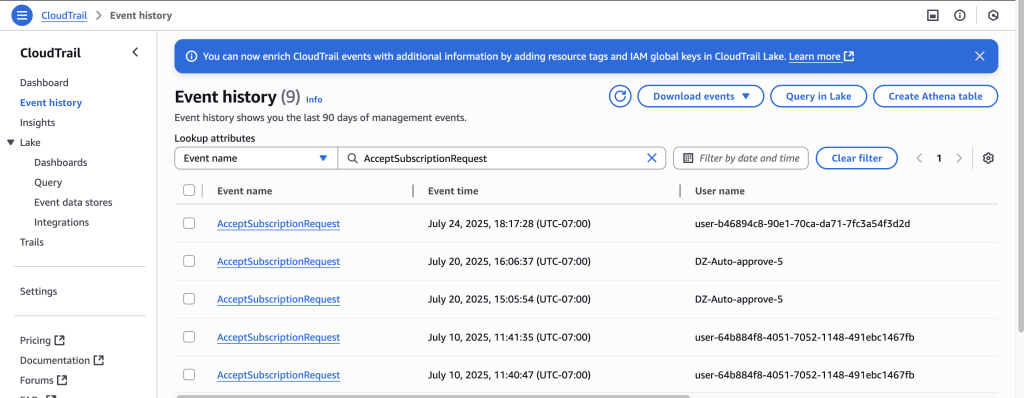
- On the CloudTrail console, choose Event history to view the event you created and review the automated approval audit trail.
Clean up
To avoid incurring future charges, clean up the resources you created during this walkthrough. The following steps use the AWS Management Console, but you can also use the AWS CLI.
- Delete the SageMaker domain. To use the AWS CLI, run the following commands:
- Delete the SNS topics. To use the AWS CLI, run the following command:
- Delete the Lambda function. To use the AWS CLI, run the following command:
Conclusion
Combining an event-driven architecture with SageMaker creates an automated, cost-effective solution for data governance challenges. This serverless approach automatically handles data access requests while maintaining compliance, so organizations can scale efficiently as their data grows. The solution discussed in this post can help data teams access insights faster with minimal operational costs, making it an excellent choice for businesses that need quick, compliant data access while keeping their systems lean and efficient.
To learn more, visit the Amazon SageMaker Unified Studio page.
About the authors
[ad_2]
Source link
