


Amazon Managed Workflows for Apache Airflow (Amazon MWAA) provides robust orchestration capabilities for data workflows, but managing DAG permissions at scale presents significant operational challenges. As organizations grow their workflow environments and teams, manually assigning and maintaining user permissions becomes a bottleneck that can impact both security and productivity.
Traditional approaches require administrators to manually configure role-based access control (RBAC) for each DAG, leading to:
- Inconsistent permission assignments across teams
- Delayed access provisioning for new team members
- Increased risk of human error in permission management
- Significant operational overhead that doesn’t scale
There is another way of doing it by defining custom RBAC roles as mentioned in this Amazon MWAA User Guide. However, it doesn’t use Airflow tags to do so.
In this post, we show you how to use Apache Airflow tags to systematically manage DAG permissions, reducing operational burden while maintaining robust security controls that complement infrastructure-level security measures.
Prerequisites
To implement this solution, you need:
AWS resources:
- An Amazon MWAA environment (version 2.7.2 or later, not supported in Airflow 3.0)
- IAM roles configured for Amazon MWAA access with appropriate trust relationships
- Amazon Simple Storage Service (Amazon S3) bucket for Amazon MWAA DAG storage with proper permissions
Permissions:
- IAM permissions to create and modify Amazon MWAA web login tokens
- Amazon MWAA execution role with permissions to access the Apache Airflow metadata database
- Administrative access to configure Apache Airflow roles and permissions
Solution overview
The automated permission management system consists of four key components that work together to provide scalable, secure access control.The following diagram shows the workflow of how the solution works.
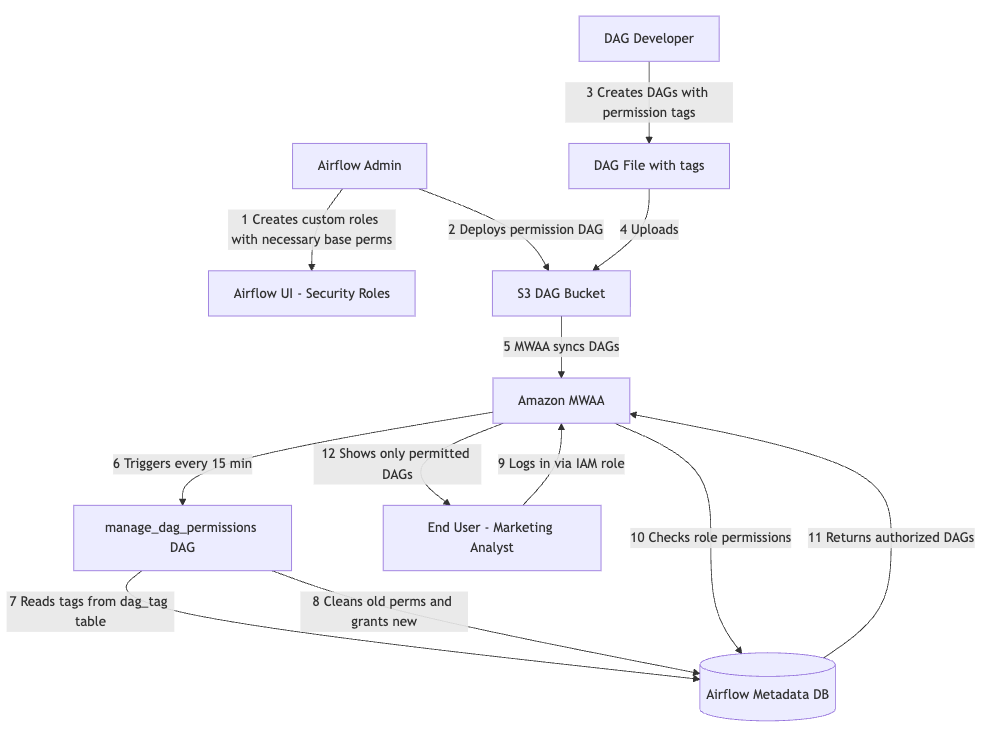
- IAM integration layer – AWS IAM roles map directly to Apache Airflow roles. Then, users authenticate through AWS IAM and are automatically assigned corresponding Airflow roles. This supports both individual user roles and group-based access patterns.
Note:- IAM Based access control to Amazon MWAA works for Apache Airflow default roles. For custom roles, the Admin user can assign the custom role using the Apache Airflow UI as mentioned in the Knowledge Center post and in the Amazon MWAA User Guide.
- If using other authenticators, the tag-based DAG permissions continue to work as stated in the AWS Big Data Blog post.
- Tag-based configuration – Apache Airflow tags defined in DAGs are used to declare access requirements. It supports read-only, edit, and delete permissions.
- Automated synchronization engine – Scheduled DAG scans all active DAGs for permission tags based on CRON schedule. It then processes tags and updates Apache Airflow RBAC permissions accordingly. Then, it provides a configuration based to control the clean-up of existing permissions.
- Role-based access control enforcement – Apache Airflow RBAC enforces the configured permissions by storing on Apache Airflow role and permissions metadata tables. Users see only the DAGs that they have access to. They have granular control over read compared to edit permissions.
Data flow
- Amazon MWAA User assumes an IAM role to access the Amazon MWAA UI.
- DAG developer adds relevant tags to the DAG definition.
manage_dag_permissionsDAG deployed to the Amazon MWAA environment runs on a CRON schedule, for example, daily.- The DAG updates the respective role permissions to the DAG by updating the Apache Airflow metadata on the Apache Airflow DB.
- Users gain or lose access based on their assigned roles.
Our solution builds upon the existing IAM integration of Amazon MWAA, while extending functionality through custom automation:
- Authentication and role mapping – Users authenticate through AWS IAM roles that map directly to corresponding Airflow roles.
- Automated user creation – Upon first login, users are automatically created in the Apache Airflow metadata database with appropriate role assignments.
- Tag-based permission control – Each Apache Airflow role contains specific DAG permissions based on tags defined in the DAGs.
- Automated synchronization – A scheduled script maintains permissions as DAGs are added or modified.
Step 1: Configure IAM to Airflow role mapping
First, establish the mapping between your IAM principals and Apache Airflow roles. To grant permission using the AWS Management Console, complete the following steps:
- Sign in to your AWS account and open the IAM console.
- In the left navigation pane, choose Users, then choose your Amazon MWAA IAM user from the users table.
- On the user details page, under Summary, choose the Permissions tab, then choose Permissions policies to expand the card and choose Add permissions.
- In the Grant permissions section, choose Attach existing policies directly, then choose Create policy to create and attach your own custom permissions policy.
- On the Create policy page, choose JSON, then copy and paste the following JSON permissions policy in the policy editor. This policy grants web server access to the user with the default Public Apache Airflow role.
{
  "Version": "2012-10-17",
  "Statement": [
    {
      "Effect": "Allow",
      "Action": "airflow:CreateWebLoginToken",
      "Resource": "arn:aws:airflow:region:account-id:environment/your-environment-name"
    }
  ]
}
Step 2: Create the automated permission management DAG
Now, create a DAG that will automatically manage permissions based on tags.
from airflow import DAG, settings
from airflow.operators.python import PythonOperator
from sqlalchemy import text
import pendulum
import logging

dag_id = "manage_dag_permissions"

class Constants:
    """
    Constants class to hold constant values used throughout the code.
    """
    AB_VIEW_MENU = "ab_view_menu"
    AB_PERMISSION = "ab_permission"
    AB_ROLE = "ab_role"
    AB_PERMISSION_VIEW = "ab_permission_view"
    AB_PERMISSION_VIEW_ROLE = "ab_permission_view_role"
    DAG_TAG = "dag_tag"

    CAN_READ = "can_read"
    CAN_EDIT = "can_edit"
    CAN_DELETE = "can_delete"


def _execute_query(sql_text, params=None, fetch=True):
    """
    Execute a parameterized SQL query against the Airflow metadata DB.
    All queries use SQLAlchemy text() with bind parameters to prevent SQL injection.

    Parameters:
        sql_text: SQL string with :named bind parameters
        params: dict of parameter values
        fetch: If True, return list of first-column values; if False, commit and return None
    Returns:
        List of values (first column) if fetch=True, else None
    Raises:
        Re-raises any exception after rollback and logging
    """
    session = settings.Session()
    try:
        stmt = text(sql_text)
        if fetch:
            result = session.execute(stmt, params or {}).fetchall()
            return [row[0] for row in result]
        else:
            session.execute(stmt, params or {})
            session.commit()
            return None
    except Exception as e:
        session.rollback()
        logging.error(f"DB query error (fetch={fetch}): {type(e).__name__}: {e}")
        raise
    finally:
        session.close()

def fetch_airflow_role_id(role_name):
    """
    Fetch role id of a given role name using parameterized query.
    """
    result = _execute_query(
        "SELECT id FROM ab_role WHERE name = :role_name",
        {"role_name": role_name},
    )
    if not result:
        raise ValueError(f"Airflow role not found: {role_name}")
    logging.info("Fetched role ID successfully")
    return result[0]

def fetch_airflow_permission_id(permission_name):
    """
    Fetch permission id of a given permission using parameterized query.
    """
    result = _execute_query(
        "SELECT id FROM ab_permission WHERE name = :perm_name",
        {"perm_name": permission_name},
    )
    if not result:
        raise ValueError(f"Airflow permission not found: {permission_name}")
    logging.info("Fetched permission ID successfully")
    return result[0]

def fetch_airflow_menu_object_ids(dag_names):
    """
    Fetch view_menu IDs for a list of DAG resource names.
    Uses parameterized IN-clause via individual bind params.

    Parameters:
        dag_names: list of DAG resource names (e.g. ['DAG:my_dag1', 'DAG:my_dag2'])
    Returns:
        list of view_menu IDs
    """
    if not dag_names:
        return []
    # Build parameterized IN clause: :p0, :p1, :p2, ...
    param_names = [f":p{i}" for i in range(len(dag_names))]
    params = {f"p{i}": name for i, name in enumerate(dag_names)}
    in_clause = ", ".join(param_names)
    result = _execute_query(
        f"SELECT id FROM ab_view_menu WHERE name IN ({in_clause})",
        params,
    )
    logging.info(f"Fetched {len(result)} view menu IDs")
    return result

def fetch_perms_obj_association_ids(perm_id, view_menu_ids):
    """
    Fetch permission_view IDs for a permission and list of view_menu IDs.
    Uses parameterized query.
    """
    if not view_menu_ids:
        return []
    param_names = [f":vm{i}" for i in range(len(view_menu_ids))]
    params = {f"vm{i}": vm_id for i, vm_id in enumerate(view_menu_ids)}
    params["perm_id"] = perm_id
    in_clause = ", ".join(param_names)
    result = _execute_query(
        f"SELECT id FROM ab_permission_view WHERE permission_id = :perm_id AND view_menu_id IN ({in_clause})",
        params,
    )
    logging.info(f"Fetched {len(result)} permission-view association IDs")
    return result

def fetch_dag_ids_by_tag(tag_name):
    """
    Fetch DAG IDs with a given tag name using parameterized query.
    """
    result = _execute_query(
        "SELECT DISTINCT dag_id FROM dag_tag WHERE name = :tag_name",
        {"tag_name": tag_name},
    )
    logging.info(f"Fetched {len(result)} DAG IDs for tag")
    return result

def associate_permission_to_object(perm_id, view_menu_ids):
    """
    Associate permission to view_menu objects (DAGs) using parameterized INSERT.
    """
    session = settings.Session()
    try:
        for vm_id in view_menu_ids:
            session.execute(
                text(
                    "INSERT INTO ab_permission_view (permission_id, view_menu_id) "
                    "VALUES (:perm_id, :vm_id) "
                    "ON CONFLICT (permission_id, view_menu_id) DO NOTHING"
                ),
                {"perm_id": perm_id, "vm_id": vm_id},
            )
        session.commit()
        logging.info(f"Associated permission to {len(view_menu_ids)} view menus")
    except Exception as e:
        session.rollback()
        logging.error(f"Error associating permission to objects: {type(e).__name__}: {e}")
        raise
    finally:
        session.close()

def associate_permission_to_role(permission_view_ids, role_id):
    """
    Associate permission_view entries to a role using parameterized INSERT.
    """
    session = settings.Session()
    try:
        for pv_id in permission_view_ids:
            session.execute(
                text(
                    "INSERT INTO ab_permission_view_role (permission_view_id, role_id) "
                    "VALUES (:pv_id, :role_id) "
                    "ON CONFLICT (permission_view_id, role_id) DO NOTHING"
                ),
                {"pv_id": pv_id, "role_id": role_id},
            )
        session.commit()
        logging.info(f"Associated {len(permission_view_ids)} permissions to role")
    except Exception as e:
        session.rollback()
        logging.error(f"Error associating permissions to role: {type(e).__name__}: {e}")
        raise
    finally:
        session.close()

def validate_if_permission_granted(permission_view_ids, role_id):
    """
    Validate if given permissions are associated to given role using parameterized query.
    """
    if not permission_view_ids:
        return []
    param_names = [f":pv{i}" for i in range(len(permission_view_ids))]
    params = {f"pv{i}": pv_id for i, pv_id in enumerate(permission_view_ids)}
    params["role_id"] = role_id
    in_clause = ", ".join(param_names)
    result = _execute_query(
        f"SELECT id FROM ab_permission_view_role "
        f"WHERE permission_view_id IN ({in_clause}) AND role_id = :role_id",
        params,
    )
    logging.info(f"Validated {len(result)} permission grants")
    return result

def clean_up_existing_dag_permissions_for_role(role_id):
    """
    Clean up existing DAG permissions for a given role using parameterized query.
    Note: this creates a brief window where the role has no DAG permissions.
    """
    _execute_query(
        "DELETE FROM ab_permission_view_role WHERE id IN ("
        "  SELECT pvr.id"
        "  FROM ab_permission_view_role pvr"
        "  INNER JOIN ab_permission_view pv ON pvr.permission_view_id = pv.id"
        "  INNER JOIN ab_view_menu vm ON pv.view_menu_id = vm.id"
        "  WHERE pvr.role_id = :role_id AND vm.name LIKE :dag_prefix"
        ")",
        {"role_id": role_id, "dag_prefix": "DAG:%"},
        fetch=False,
    )
    logging.info("Cleaned up existing DAG permissions for role")

def sync_permission(config_data):
    """
    Sync permissions based on the config.

    Parameters:
        config_data: dict with keys:
            - airflow_role_name: name of the custom Airflow role
            - managed_dags: list of DAG IDs to grant full management permissions on
              (can_read, can_edit, can_delete)
            - do_cleanup: if True, remove all existing DAG:* permissions first
    """
    # Get the role ID for role name
    role_id = fetch_airflow_role_id(config_data["airflow_role_name"])

    # Clean up existing DAG level permissions if requested
    if config_data.get("do_cleanup", False):
        clean_up_existing_dag_permissions_for_role(role_id)

    managed_dags = config_data.get("managed_dags", [])
    if not managed_dags:
        logging.info("No managed DAGs found, skipping permission sync")
        return

    # Determine which permissions to grant (default: can_read only)
    permissions = config_data.get("permissions", [Constants.CAN_READ])

    # Build DAG resource names (e.g. ["DAG:my_dag1", "DAG:my_dag2"])
    dag_resource_names = [f"DAG:{dag.strip()}" for dag in managed_dags]

    # Get IDs for DAG view_menu objects
    vm_ids = fetch_airflow_menu_object_ids(dag_resource_names)
    if not vm_ids:
        logging.info("No view_menu entries found for managed DAGs")
        return

    # Grant the configured permissions on each managed DAG
    all_perm_view_ids = []
    for perm_name in permissions:
        perm_id = fetch_airflow_permission_id(perm_name)
        associate_permission_to_object(perm_id, vm_ids)
        all_perm_view_ids += fetch_perms_obj_association_ids(perm_id, vm_ids)

    # Associate permission_view entries with the role and validate
    if all_perm_view_ids and role_id:
        associate_permission_to_role(all_perm_view_ids, role_id)
        validate_if_permission_granted(all_perm_view_ids, role_id)

def sync_permissions_with_tags(role_mappings):
    """
    For each role mapping, fetch DAG IDs by tag and sync permissions.
    """
    for role_map in role_mappings:
        username = list(role_map.keys())[0]
        airflow_role = role_map[username]["airflow_role"]
        edit_tag_name = role_map[username]["airflow_edit_tag"]

        config_data = {
            "airflow_role_name": airflow_role,
            "managed_dags": fetch_dag_ids_by_tag(edit_tag_name),
            "permissions": role_map[username].get("permissions", [Constants.CAN_READ]),
            "do_cleanup": role_map[username].get("do_cleanup", True),
        }
        logging.info(f"Syncing permissions for airflow role")
        sync_permission(config_data)
        logging.info("Completed permission sync for role")

"""
    Add new roles and permissions here.
    Format:
    {
       "": {
            "airflow_role": ,
            "airflow_edit_tag": ,
            "permissions": ,
            "do_cleanup":
        }
    },

    IMPORTANT - ROLE SETUP:
    When creating a new custom role (e.g. "analytics_reporting", "marketing_analyst")
    in the Airflow UI (Security > List Roles), you MUST copy the Viewer role's
    permissions into the new role. The Viewer permissions provide base UI access
    (browse DAGs, view logs, menu access, etc.). --or-- Assign the viewer role as well.
    Without them, users assigned to
    the custom role will not be able to log in to the Airflow UI.

    This DAG manages DAG-level permissions on DAG:xxx resources.
    Which permissions are granted is controlled by the "permissions" list
    in each config entry (options: can_read, can_edit, can_delete).
    It does NOT manage base UI permissions — those must be set up manually
    when creating the role.

    Steps to create a new custom role:
    1. Go to Security > List Roles > + (Add)
    2. Name it to match the "airflow_role" value in the config below
    3. Copy all permissions from the "Viewer" role into the new role
    4. Save — this DAG will then automatically add DAG-specific permissions
       (as configured in the "permissions" list) for each tagged DAG
"""
role_mappings = [
    {
        "analytics_reporting": {
            "airflow_role": "analytics_reporting",
            "airflow_edit_tag": "analytics_reporting_edit",
            "permissions": ["can_read", "can_edit", "can_delete"],
            "do_cleanup": True,
        }
    },
    {
        "marketing_analyst": {
            "airflow_role": "marketing_analyst",
            "airflow_edit_tag": "marketing_analyst_edit",
            "permissions": ["can_read", "can_edit", "can_delete"],
            "do_cleanup": True,
        },
    },
]

with DAG(
    dag_id=dag_id,
    schedule="*/15 * * * *",
    catchup=False,
    start_date=pendulum.datetime(2026, 1, 1, tz="UTC"),
) as dag:
    sync_dag_permissions_task = PythonOperator(
        task_id="sync_dag_permissions",
        python_callable=sync_permissions_with_tags,
        op_kwargs={"role_mappings": role_mappings},
    )
Step 3: Tag your DAGs for access control
Add appropriate tags to your DAGs to specify which roles should have access. Tags are used to define which roles have access to tagged DAGs.
# Example DAG for analytics_reporting
with DAG(
    "analytics_reporting_dag",
    description="Daily analytics reporting pipeline",
    schedule_interval="@daily",
    start_date=pendulum.datetime(2023, 1, 1, tz="UTC"),
    catchup=False,
    tags=["reporting", "analytics", "analytics_reporting_edit"]
) as dag:
    # DAG tasks here
    pass


# Example DAG for marketing_analyst
with DAG(
    "marketing_analyst_dag",
    description="Daily marketing lead analysis pipeline",
    schedule_interval="@daily",
    start_date=pendulum.datetime(2023, 1, 1, tz="UTC"),
    catchup=False,
    tags=["marketing", "analytics", "marketing_analyst_edit"]
) as dag:
    # DAG tasks here
    pass
In this example:
- The
analytics_reportingcustom role will have read, edit, and delete access to the DAGanalytics_reporting_dag(and other DAGs tagged withanalytics_reporting_edit) - The
marketing_analystcustom role will have read, edit, and delete access to the DAGmarketing_analyst_dag(and other DAGs tagged withmarketing_analyst_edit)
The exact permissions granted (can_read, can_edit, can_delete) are configurable per role in the role_mappings config inside the permission management DAG:
role_mappings = [
    {
        "analytics_reporting": {
            "airflow_role": "analytics_reporting",
            "airflow_edit_tag": "analytics_reporting_edit",
            "permissions": ["can_read", "can_edit", "can_delete"],
            "do_cleanup": True,
        }
    },
    {
        "marketing_analyst": {
            "airflow_role": "marketing_analyst",
            "airflow_edit_tag": "marketing_analyst_edit",
            "permissions": ["can_read", "can_edit", "can_delete"],
            "do_cleanup": True,
        },
    },
]
Note: Before this DAG can manage permissions for a custom role, the role must be created manually in the Apache Airflow UI (Security > List Roles) with the Viewer role’s permissions copied in. See Step 2 for details.
Step 4: Deploy and test
- Upload both the permission management DAG and your tagged DAGs to your Amazon MWAA environment’s S3 bucket.
- Wait for Amazon MWAA to detect and process the new DAGs.
- Verify that the permission management DAG runs successfully.
- Test access with different user roles to confirm proper permission enforcement.
- Users can also integrate this with their CI/CD processes.
Troubleshooting
In this section, we cover some common issues and how to troubleshoot them.
Permission sync failures
Symptom: Permission sync DAG fails with database errors.
Cause: Insufficient permissions on MWAA execution role.
Solution: Ensure that the execution role has airflow:CreateWebLoginToken permission and database access.
Tags not being processed
Symptom: DAG tags are present but permissions aren’t updated.
Solution: Check that DAG is active and parsed successfully – Review permission sync DAG logs for processing errors.
Users cannot access expected DAGs
Symptom: Users with correct IAM roles cannot see DAGs
Solution: Confirm that IAM to Apache Airflow role mapping is correct. Verify that the permission sync DAG has run successfully. Check Amazon CloudWatch Logs for permission assignment errors.
Performance issues
Symptom: Permission sync takes too long or times out.
Solution: Reduce sync frequency for large environments. Consider batching permission updates. Monitor DAG execution time and optimize accordingly.
Debugging steps
- Check Amazon MWAA environment health and connectivity
- Review permission sync DAG execution logs
- Verify IAM role configurations and trust relationships
- Test with a single DAG to isolate issues
- Monitor CloudWatch Logs for detailed error messages
Benefits and considerations
Automated permission management offers you significant operational advantages while enhancing your security. You will benefit from reduced administrative overhead as manual permission assignments are removed, so you can scale seamlessly without additional burden. Your security improves through consistent application of least-privilege principles and reduced human error. You will enhance your developer experience with automatic access provisioning that shortens onboarding time, while your system supports environments with over 500 DAGs without performance degradation.
When you implement these systems, you must adhere to key security practices. You should apply the principle of least privilege, validate tags to make sure that you’re only processing authorized tags, and establish comprehensive audit mechanisms including CloudTrail logging. Your access control measures should restrict permission management functions to administrators while you utilize appropriate role separation for different user personas.
You will need to consider several technical limitations during your implementation. IAM-based access control to Amazon MWAA works only with Apache Airflow default roles, not custom ones, though your tag-based permissions function with alternative authenticators. Permission changes propagate based on DAG schedules, potentially causing delays. You should establish approval processes for your production changes, maintain version control for permissions, and document your rollback procedures to ensure your system’s resilience and security.
Clean up
Clean up resources after your experimentation:
- Delete the Amazon MWAA environments using the console or AWS CLI.
- Update the IAM role policy or delete the IAM role if not needed.
Conclusion
In this post, you learned how to automate DAG permission management in Amazon MWAA using Apache Airflow’s tagging system. You saw how to implement tag-based access control that scales efficiently, reduces manual errors, and maintains least-privilege security principles across hundreds of DAGs. You also explored the key security practices and technical considerations that you need to keep in mind during implementation.
Try out this solution in your Amazon MWAA environment to streamline your permission management. Start by implementing the tagging system in a development environment, then gradually roll it out to production as your team becomes comfortable with the approach.
About the authors
