


[ad_1]
Authored by: Anuradha & Prabudh
PDF converting software can be super helpful. Whether you’re turning a Word document into a PDF or merging files into one neat package, these tools save time and make life easier.
But here’s something many people don’t realize — some of these free PDF tools come with hidden baggage. When you install them, they might also sneak in a new search engine, browser extension, or change your homepage without clearly asking for permission. 
What’s Going On?
Some PDF software is bundled with extra programs. That means when you download and install the PDF converter, it may also install:
- A new search engine in your browser
- Toolbars or browser extensions
- Apps that run in the background on your computer
Most of the time, these are not viruses, but they can slow down your computer, change your browsing experience, and even collect your data.
Geographical Customer Prevalence
The heat map below illustrates the prevalence of EPI PDF software in the field in Q2, 2025.
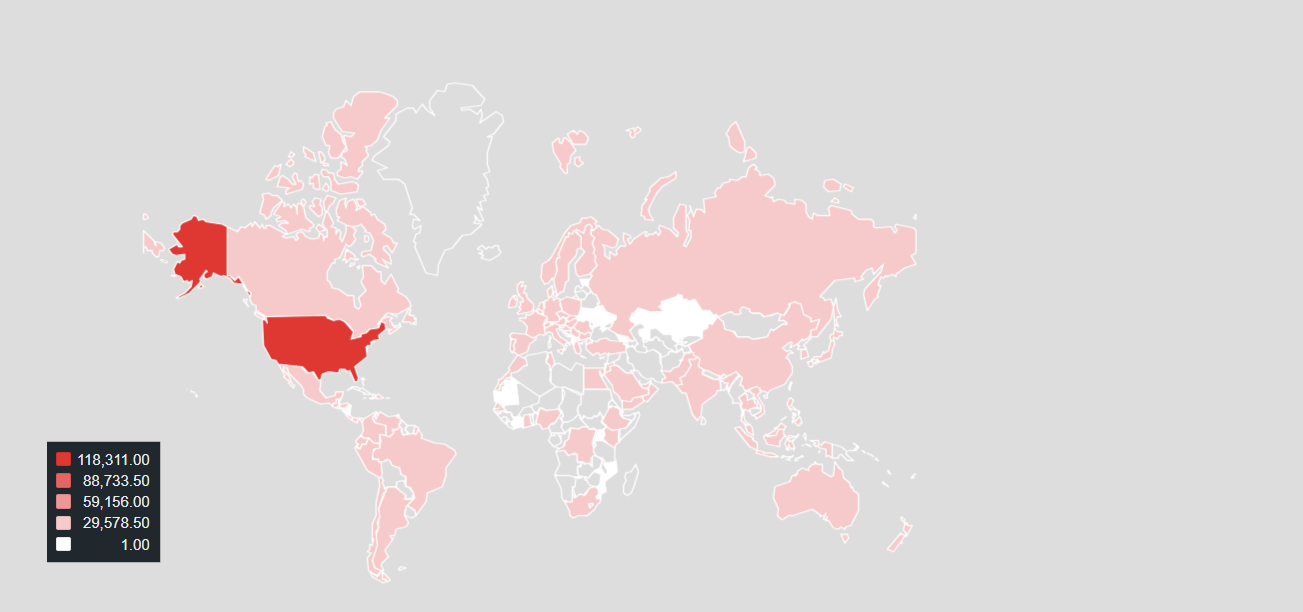
We see that the top country encountering this software is the United States of America with over 118,000 McAfee device encounters.
Why Do They Do This?
Many free software companies make money by including these extras. Other companies pay them to promote their search tools or browser extensions. It’s a way for them to earn something in return for offering the software for free.
During our daily hunt at McAfee to secure our customer, we came across one such bundler application called EPI PDF Editor that clearly had deceptive nature towards the end user.
Key Takeaways:
- Read Before You Click “Next”
Always take a moment during installation to read what each screen says. Look for checkboxes that let you “opt out” of installing extra software. - Choose “Custom” or “Advanced” Installation
This gives you more control over what gets installed on your computer. - Download From Trusted Sources
Stick to well-known websites or the official site of the PDF software. Avoid shady download links from ads or pop-ups. - Use Built-In Tools
Many operating systems (like Windows or macOS) already have simple PDF features like printing to PDF or viewing files, so you might not need extra software at all. - Check Your Browser
If your homepage suddenly changes or you see a new search engine, go to your browser settings and change it back.
McAfee researches such applications proactively, and we review the EULA and Privacy Policy regularly for new applications.
Technical Analysis
EPI PDF Editor is distributed as an MSI installer. Upon launching, the installer window includes a pre-selected option to “Import your current browser settings into EPI PDF,” a choice that appears unrelated to the tool’s intended purpose of handling PDF documents. Unless the user actively opts out by unchecking the box, this action will continue automatically.
Installer Branding Mismatch
The installer is branded as “PDF Converter,” indicating that it is designed for typical PDF tasks such as viewing, converting, splitting, merging, and watermarking documents. However, the inclusion of an opt-out option to import browser settings raises questions about the application’s true functionality.
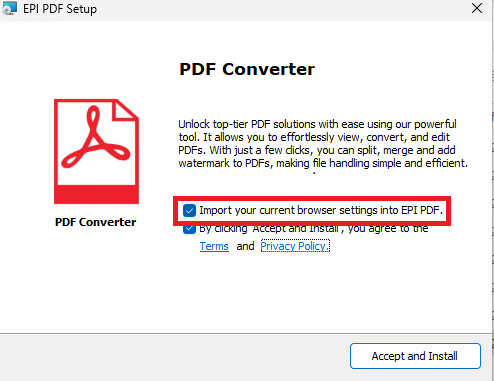
Figure 1: Import browser settings
Privacy Policy Conflict
A closer examination of the software’s Privacy Policy and Terms reveals a deceptive practice at play. Although the application is marketed as a PDF Converter, the legal documentation tells a different story. As shown in Figure 2, the Privacy Policy of the program—branded as EPIbrowser—explicitly defines the software as a browser designed for Windows-based devices. The screenshot displays both the EPIbrowser logo and the policy text, clearly indicating that the user is not installing a PDF tool, but rather a web browser disguised as one.
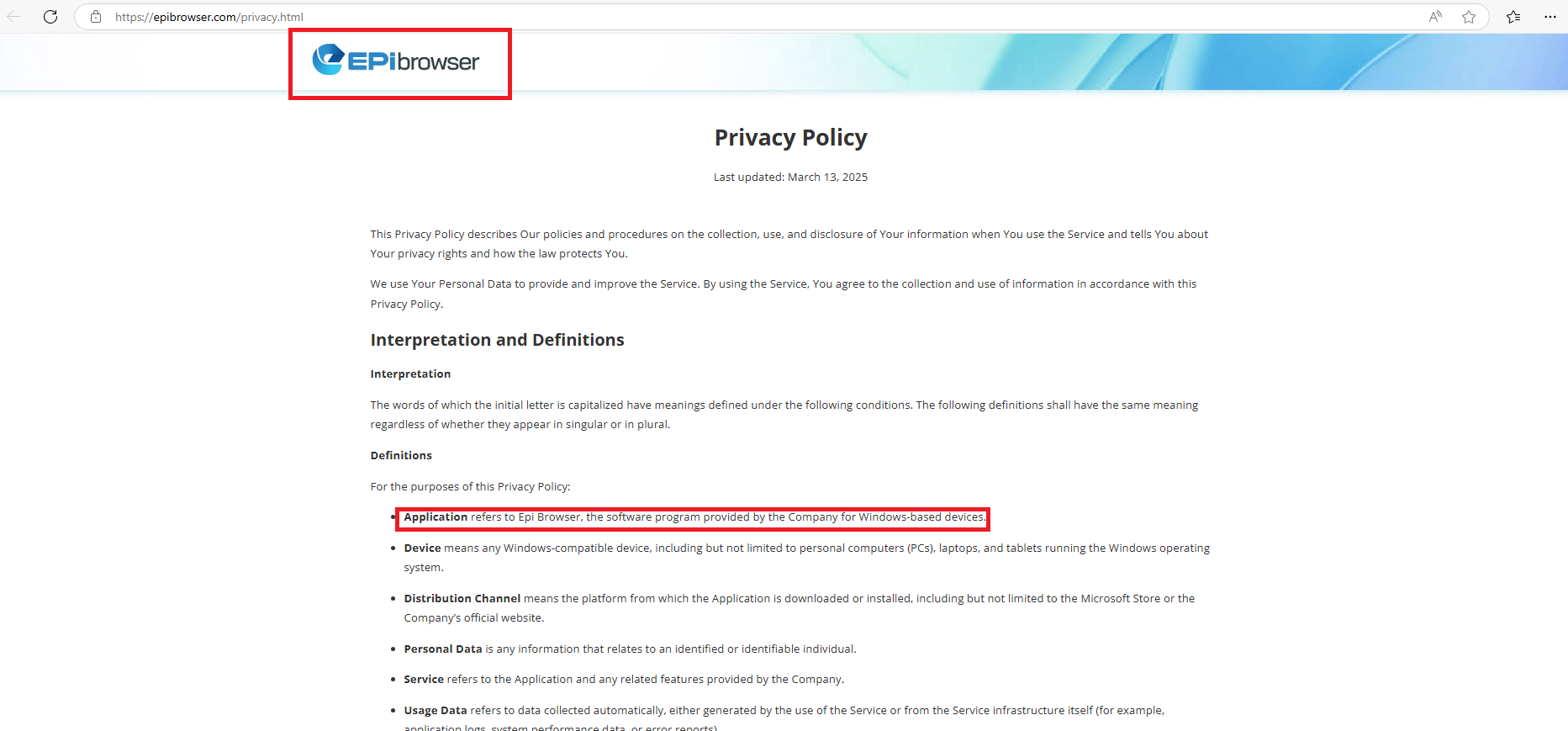
Figure 2: Application name in terms & conditions

Figure 3: Application meaning in terms
McAfee’s *PUP Policy states that Software installers must provide software licensing information prior to installing any bundled components.No ‘installation completed’ window pops up but instead, a chromium-based browser opens with a tab opened that too with deceptive behavior i.e. options are present to edit the opened pdf but no action being performed. We can browse the internet by opening other tabs.

Figure 4: Tab in EPI Browser
McAfee PUP policy violated here is, ”Installation: whether the user can make an informed decision about the software installation or add-ons and can adequately back out of any undesired installations.” Another suspicious behavior observed is install location i.e. from ‘Appdata/Temp’ instead of Program Files or Program Files(x86). Further while checking control panel we found that sample has created the entry with EPI Browser only and can be uninstalled. Due to its deceptive behavior, which aligns with the McAfee violation criteria, this application has been classified as a Potentially Unwanted Program (PUP).
The McAfee WebAdvisor browser extension warns users when attempting to navigate to websites known to distribute PUPs.

Figure 5: McAfee Web Advisor Warning
Bottom Line
Free PDF tools are useful — but be aware of what else might come with them. A few extra minutes of reading can save you from hours of frustration later. ✅
Stay smart. Stay safe. And always know what you’re really installing.
Indicator of Compromise
| App Name | Distributed in different file names | SHA256 |
| EPI PDF Editor | viewpdftools.msi | c2d1ac2511eb2749cdc7ae889d484c246d3bd1e740725dc4dd2813c4b4d05c7b |
| onestartpdfdirect.msi | ||
| PDFSmartKit.msi | ||
| pdfzonepro.msi | ||
| 6c9136.msi | ||
| OneStartPDF-v4.5.282.2.msi |
In a digital world where convenience often comes at a hidden cost, it’s crucial to be vigilant about the software we install — especially free tools like PDF converters. As the case of EPI PDF Editor highlights, not all applications are what they claim to be. Deceptive installations, hidden browser hijackers, and unauthorized data collection can compromise both your privacy and your device’s performance. By staying informed and cautious — reading installation prompts, choosing advanced options, and relying on trusted sources — you can protect yourself from potentially unwanted programs and avoid falling into these traps.
At McAfee, our goal is to help users stay one step ahead of deceptive software. Awareness is your first line of defense. So, the next time you download a free tool, take a moment to think before you click. Because what seems like a simple installation could be opening the door to much more.
*PUP :- PUP stands for Potentially Unwanted Program that are used to deliver users some unwanted applications like ads, browser addon, search engine modification, extra programs that a user is generally using for daily purpose.
[ad_2]
Source link
